|
VOOZH | about |
|
VOOZH | about |
Web scraping is the process of automatically extracting data from websites and converting it into a structured format such as tables or files. In this article, we will learn how to scrape quotes from a website using Python libraries like Requests and BeautifulSoup and store the extracted data in a DataFrame for analysis.
Installed the following Python libraries:
We first import the required libraries such as requests and beautifulSoup. It sends a request to the website.
website used in this article: https://quotes.toscrape.com/
Now, we extract all the quote texts present on the page.
Finds all author names and stores them inside a list.
In this step, we extract all information related to each quote. Extracts quote text, Extracts author name, Extracts author profile link, extracts all tags, Prints everything for verification.
Output:
We now store all extracted values together so they can be converted into a table later.
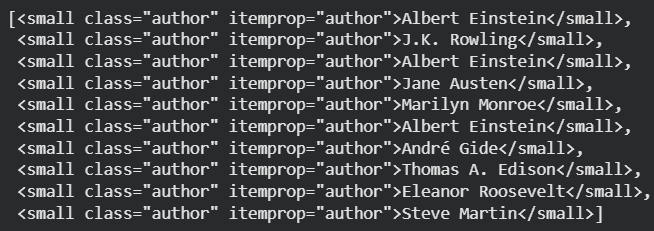
This step collects all author HTML elements from the page, which can be useful for further inspection or advanced data extraction.
Output:
Here, we extract all tags associated with a quote to understand the themes or categories linked to it.
This step focuses on isolating just the quote text from the HTML structure for clean and direct use.
Output:
A day without sunshine is like, you know, night.
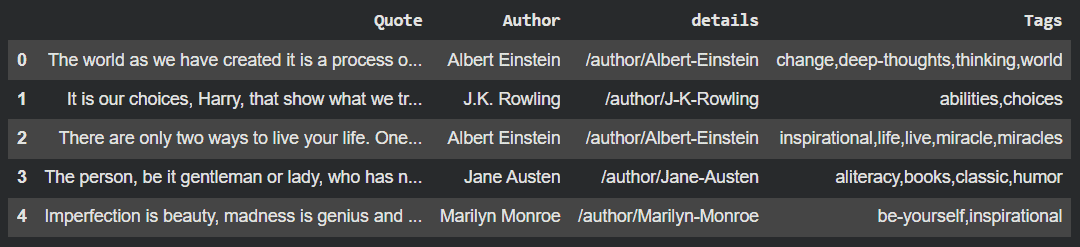
Converts scraped data into a table. Makes it easier to analyze and store.
Output:
In this step, we automate the scraping process across multiple pages to gather a larger and more complete dataset.
Converts all scraped pages into a DataFrame. Renames columns and builds full author profile URLs.
Output:
Now we have created a dataframe and it can be further used for analysis and model making.