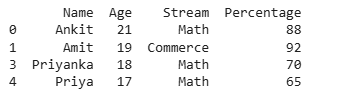
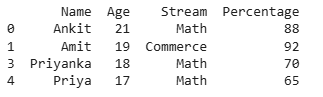
Filtering rows in a Pandas DataFrame means selecting specific records that meet defined conditions. Pandas provides several efficient ways to do this, such as boolean indexing, .loc[], .isin(), and .query().
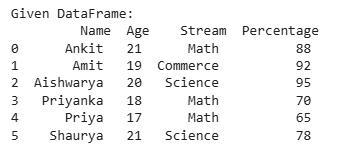
Sample Dataframe The code below creates a dataframe which we will be using in this example:
Output
👁 s1 Preview of Dataframe Selecting Rows Based on Column Values You can use comparison operators like >, <, == , != , >=, <= to filter rows.
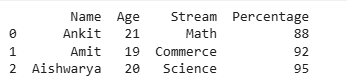
Example 1: Select rows where Percentage > 80 (basic method) Output
👁 s2 Explanation:
dataframe['Percentage'] > 80: creates a boolean Series for filtering. dataframe[condition]: returns rows where the condition is True. Example 2: Using .loc [] Output
👁 s3 Explanation:
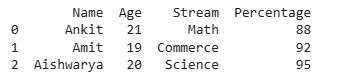
.loc[] accesses rows and columns by labels or boolean conditions. Returns the filtered DataFrame similar to boolean indexing. Example 3: Using .query() Output
👁 s3 Explanation:
The string 'Percentage > 80' is evaluated for each row. --------------------------------------------------- Only rows where the condition is True are returned. Selecting Rows Based on Membership (isin()) You can filter rows based on whether a column’s value exists in a list.
Example 1: Select rows where Stream is in a given list Output
👁 s4 Explanation:
.isin(list) checks if each value exists in the provided list. Returns a boolean Series used to filter rows. Example 2: using .loc[] with .isin() Output
👁 s5 Example 3: Selecting Rows Where Stream Is Not in the List Output
👁 s6 Explanation:
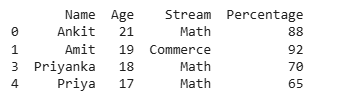
~ operator negates the boolean Series, selecting rows not in the list.
Example 4: Using .isin() with .query() Output
👁 s7 Selecting Rows with Multiple Conditions You can combine multiple conditions using logical operators:
Note: Always use parentheses around each condition.
Example 1: Select rows where Age == 21 AND Stream is in options Output
👁 s8 Example 2: using .loc[] with Multiple Conditions Output
👁 s8 Explanation:
(dataframe['Age'] == 21): creates a boolean Series for age condition. dataframe['Stream'].isin(options): creates a boolean Series for stream condition. "&" combines both conditions. .loc[] returns rows satisfying all conditions. Example 3: Using .query() with Multiple Conditions