|
VOOZH | about |
|
VOOZH | about |
Docker provides a standardized environment to develop, test and deploy applications in an isolated container ensuring that your code works seamlessly regardless of where it’s run.
In this article, we will learn about the basics of Docker and containers, how to set Docker for Python projects, etc.
Table of Content
Docker is a platform designed to automate the deployment of applications inside a lightweight portable container. These containers include everything the application needs to run such as external libraries, dependencies, databases, and the application code itself. By isolating applications in containers, Docker ensures that they behave the same way across different environments from your local machine to the production server.
A container is a standard unit of software that encapsulates everything needed to run an application including code, runtime, libraries and configurations. Unlike virtual machines, containers share the host system's OS kernel and are much lighter which makes them faster to start and more efficient in resource usage.
Install Docker Desktop by downloading it from Docker's official website. Follow the installation instructions and make sure Docker Desktop is running
Run the following commands to install Docker on Ubuntu/Debian-based systems:
sudo apt update
sudo apt install docker.io
sudo systemctl start docker
sudo systemctl enable docker
docker --versionYou can refer the below article for installation of docker:
Follow the below steps to Step up a docker for python project
First, create a simple Python project locally and add Python Files: Create a simple Python script inside your project directory. For example: app.py
A Dockerfile is a text file that contains instructions to build a Docker image which is a snapshot of the environment your project needs to run. For Python projects, a Dockerfile typically defines the base Python image, installs dependencies and sets up the application environment.
# Use an official Python runtime as a parent image
FROM python:3.9-slim

# Set the working directory in the container
WORKDIR /usr/src/app

# Copy the current directory contents into the container at /usr/src/app
COPY . .

# Install any needed packages specified in requirements.txt
RUN pip install --no-cache-dir -r requirements.txt

# Make port 80 available to the world outside this container (Optional, only for web apps)
EXPOSE 80

# Define environment variable (optional)
ENV NAME World

# Run app.py when the container launches
CMD ["python", "./app.py"]
Managing dependencies in Docker is simple because you define them in a requirements.txt file (for Python) and then install them during the image build process.
the following requirements.txt file can specify the dependencies needed for your Python app:
flask==2.0.1
requests==2.25.1
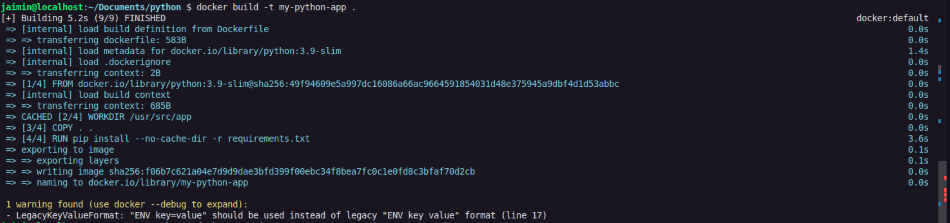
Now, build your Docker image based on the Dockerfile. Run the following command from the root of your project directory (where the Dockerfile is located):
docker build -t my-python-app .After building the image, you can run your Python app inside a Docker container. Use the following command:
docker run -it --rm --name my-running-app my-python-appFor Applications that is going to continuously run on a PORT, you have to mentions the outside port in DockerFile and use the following command when running the container:
docker run -d -p 5000:5000 --restart unless-stopped flask-appIn this command:
If your Python project involves multiple services, such as a web application and a database, you can use Docker Compose to manage them in a single YAML configuration file.
Here’s an example docker-compose.yml file for a Python Flask app and PostgreSQL database:
version: '3'
services:
 web:
 build: .
 ports:
 - "5000:5000"
 environment:
 - POSTGRES_USER=admin
 - POSTGRES_PASSWORD=secret
 depends_on:
 - db
 db:
 image: postgres
 environment:
 POSTGRES_USER: admin
 POSTGRES_PASSWORD: secret
To run this setup, simply execute (where your compose file is present):
docker-compose upDocker is a powerful tool that provides consistency, portability and ease of deployment across different environments. By containerizing your application, you can ensure that it behaves the same way everywhere from development to production. By following this article, you can easily setup your python projects in docker environment.