|
VOOZH | about |
|
VOOZH | about |
PyCharm is Python IDE developed by JetBrains, widely used for software development, data science and scientific computing. SciPy is a core library for scientific computing in Python used for advanced mathematics, signal processing, linear algebra and much more.
To use SciPy in PyCharm, these two methods are follow:
Before Starting, make sure Python and PyCharm is installed on your system.
To install Python, click here
To install PyCharm, click here
Open PyCharm and create a new Python project or open an existing one.
Go to:
Since SciPy depends on NumPy, install it first using terminal:
pip install numpy
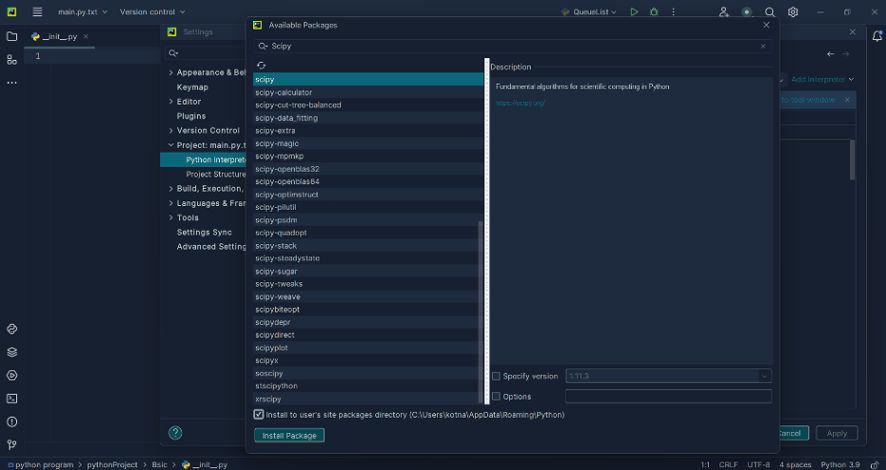
In Settings/Preferences, navigate to: Project: <YourProjectName> --> Python Interpreter
You'll see a list of installed packages.
Click the "+" icon to open the package installer, then search for scipy in the search bar. Select SciPy from the results and click Install Package to complete the installation.
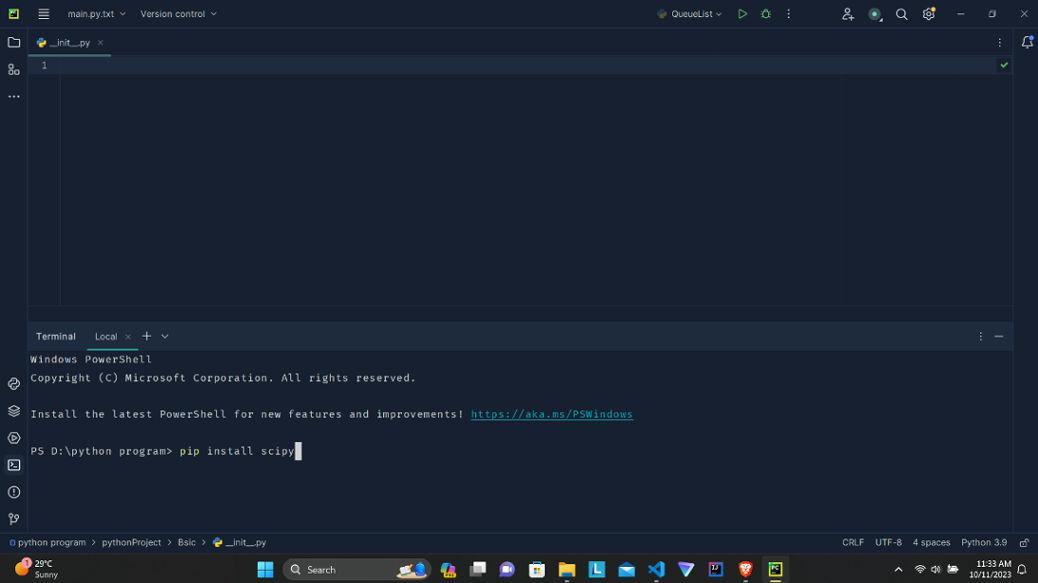
If you prefer using the terminal, you can install SciPy directly using pip.
Click on the "Terminal" tab at the bottom of PyCharm.
pip install scipy
Or, if python3 is used on your system:
python3 -m pip install scipy
PyCharm will install the package into your current project interpreter.
Related Articles: