|
VOOZH | about |
|
VOOZH | about |
In this article, we'll delve into the concept of WebSockets and their role in facilitating bidirectional communication between clients and servers. Subsequently, we'll embark on the journey of building a real-time multi-client chat application. This application will empower numerous users to connect to the server via the WebSocket protocol, fostering seamless message exchange between them.
FastAPI, a Python web framework, has garnered substantial acclaim for its contemporary approach to API development. It's distinguished by its outstanding performance, user-friendly design, and automatic creation of interactive API documentation. Compatible with Python 3.6 and later, FastAPI employs Python's type hinting system to validate, serialize, and document data. Notably, it provides robust support for asynchronous programming, enabling the creation of high-performance, non-blocking APIs.
WebSocket facilitates bidirectional communication between a client and a server via a single TCP connection. It is primarily employed for real-time server communication. For instance, in a web application featuring a user leaderboard, users typically need to repeatedly request the latest leaderboard data from the server. To address this, users can connect to the server using the WebSocket protocol, enabling the server to transmit the most recent leaderboard information to the client without necessitating frequent HTTP requests.
We are creating a simple chat application that will allow multiple users to send messages to each other. For this purpose, we are going to create a ConnectionManager class, which will be responsible for accepting WebSocket requests from clients and sending messages to single users, and groups of connected users. The ConnectionManager class will maintain a list of WebSocket connections.
pip install fastapi
pip install websockets
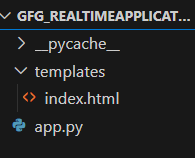
Step 2: To set up the project structure, create a folder named gfg_realtime_application. Inside this folder, create another folder templates, and within the templates folder, create a file named index.html and copy the following content into it. We will need FastAPI and WebSockets to create the real-time chat application.
File Structure:
Step 3: index.html
This code creates a basic WebSocket client that connects to a WebSocket server, displays messages received from the server, and allows users to send messages to the server through a simple web interface.
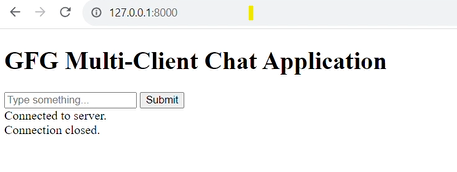
<script> section creates a WebSocket connection to the server using the WebSocket constructor. It uses the address ws://127.0.0.1:8000/ws/ and appends a random id to the URL.showMessage function that appends messages to the container div on the webpage. It's used to display messages received from the WebSocket server.'open' event), it displays a "Connected to server" message. When a message is received from the server ('message' event), it displays the received message in the container. When the connection is closed ('close' event), it shows a "Connection closed" message.socket.send(inputValue) method. This allows users to send messages to the WebSocket server.Output:
Step 4: app.py
In the above code:
ConnectionManager, is responsible for managing WebSocket connections. It maintains a list of active WebSocket connections (self.active_connections). It has methods to connect, disconnect, send personal messages, and broadcast messages to all connected clients./ws/{client_id} endpoint is where WebSocket connections are handled. When a client connects, it calls the connectionmanager.connect(websocket) to accept and add the connection to the list. It then enters a loop to receive messages from the client, sending personal messages back to the sender and broadcasting messages to all connected clients./ endpoint renders an HTML template using Jinja2 templates. This template is typically used to serve the web interface for the chat application. It allows users to input text and send messages.WebSocketDisconnect. When a client disconnects, this exception is raised, and it calls connectionmanager.disconnect(websocket) to remove the disconnected client from the list and broadcasts a message to inform others about the departure.ConnectionManager instance (connectionmanager) to handle WebSocket connections. Clients can access the chat interface via a web page served at the root URL (/). When a client connects via a WebSocket to the /ws/{client_id} endpoint, they can send and receive messages to and from other clients. The ConnectionManager helps manage these WebSocket connections and messaging.Step 5: Run the below command in your terminal and open the browser .
python -m uvicorn app:app --reload
The above command will start the server on localhost port 8000.
Output