|
VOOZH | about |
|
VOOZH | about |
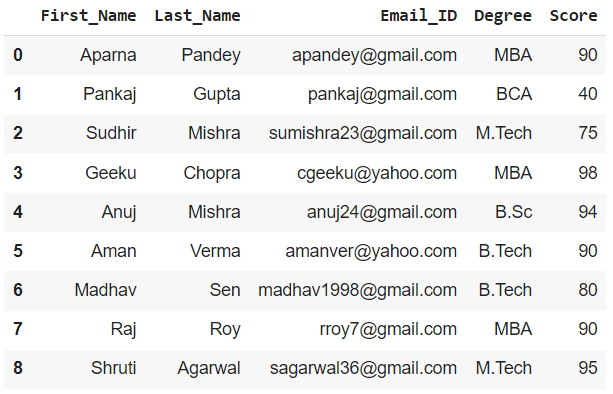
In this article, we are going to see how to divide a dataframe by various methods and based on various parameters using Python. To divide a dataframe into two or more separate dataframes based on the values present in the column we first create a data frame.
Output:
👁 ImageWe can create multiple dataframes from a given dataframe based on a certain column value by using the boolean indexing method and by mentioning the required criteria.
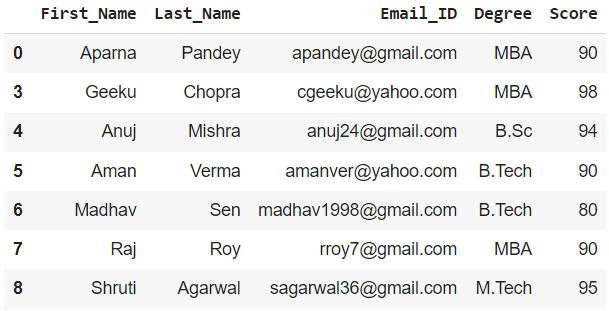
Example 1: Creating a dataframe for the students with Score >= 80
Output:
👁 ImageExample 2: Creating a dataframe for the students with Last_Name as Mishra
Output:
👁 ImageWe can do the same for other columns as well by putting the appropriate condition
We create a mask variable for the condition of the column in the previous method
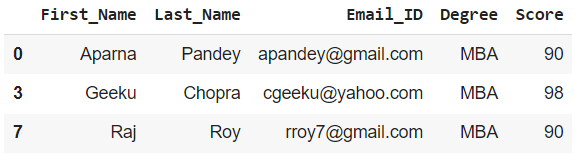
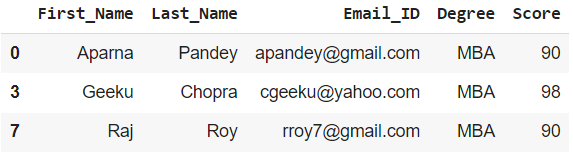
Example 1: To get dataframe of students with Degree as MBA
Output :
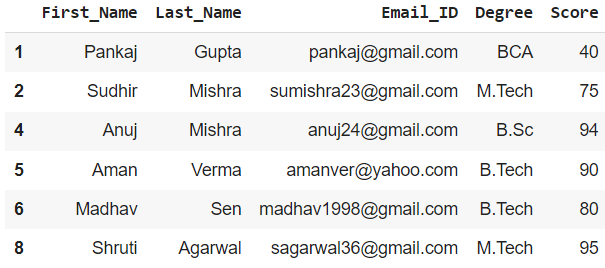
👁 ImageExample 2: To get a dataframe for the rest of the students
To get the rest of the values in a dataframe we can simply invert the mask variable by adding a ~(tilde) after it.
Output :
👁 ImageUsing groupby() we can group the rows using a specific column value and then display it as a separate dataframe.
Example 1: Group all Students according to their Degree and display as required
Output: dataframe of students with Degree as MBA
👁 ImageExample 2: Group all Students according to their Score and display as required