|
VOOZH | about |
|
VOOZH | about |
In the realm of programming and natural language processing, there's an opportunity to create engaging and creative applications that spark the imagination. One such project is the development of a Story Generator App using Python. In this article, we'll embark on a journey to understand how to build a simple yet intriguing story generator application.
Storytelling has been an integral part of human culture for centuries. From epic tales of heroes and adventures to bedtime stories that capture the imagination of children, storytelling has a timeless appeal. With the advent of technology, we can harness the power of programming to create stories that are both captivating and limitless.
Below are the steps by which we can build a story generator app using Python:
We must have the following things install in our system before starting:
We can simply install Flask by using the following command:
pip install flaskTo generate stories, we'll need a dataset of sentences or phrases that our app can use as building blocks. You can create your dataset or use an existing one. For our example, we'll use a simple dataset of phrases:
Next, create a folder named templates in the same directory as your Python script. Inside the templates folder, create an index.html file with the following content:
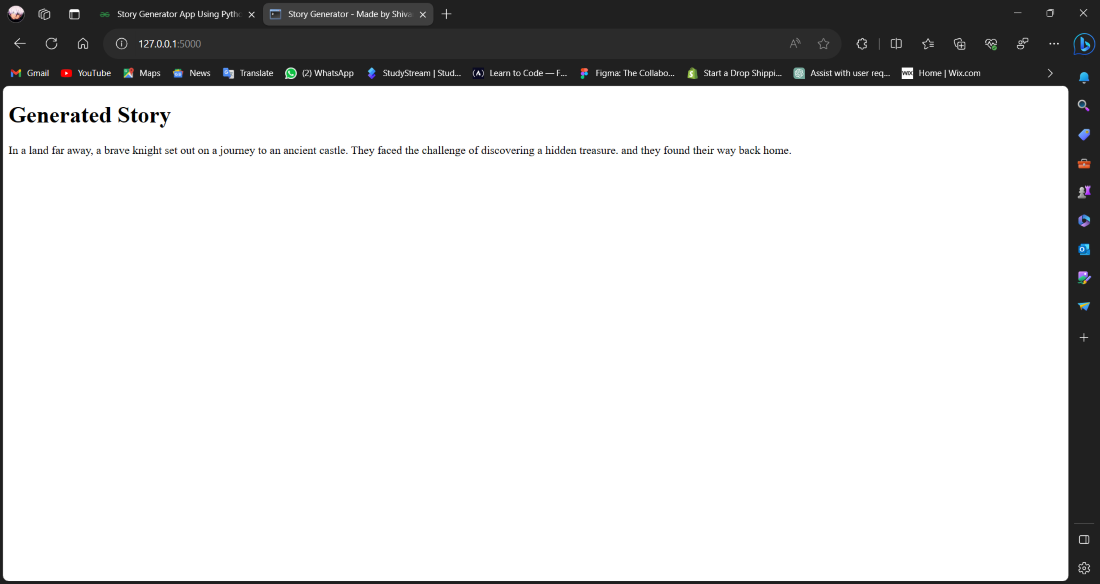
To run your Flask app, execute your Python script. Open a web browser and navigate to http://127.0.0.1:5000/, and you will see a randomly generated story each time you refresh the page.
👁 mainpy---Story-Generator-App---Visual-Studio-Code-[Administrator]-13-10-2023-23_13_04-(1)
Now, let's create a function to generate a story by combining random phrases, nouns, verbs, and objects from our dataset:
After writing the code make a folder named story generated app and save the file using python extension main.py
In this step, we will run our flask app by opening our web browser and navigating to http://127.0.0.1:5000/, and we will see a randomly generated story each time you refresh the page.
Output

![👁 mainpy---Story-Generator-App---Visual-Studio-Code-[Administrator]-13-10-2023-23_13_04-(1)](https://media.geeksforgeeks.org/wp-content/uploads/20231016125847/mainpy---Story-Generator-App---Visual-Studio-Code-%5BAdministrator%5D-13-10-2023-23_13_04-(1).png)
![👁 mainpy---Story-Generator-App---Visual-Studio-Code-[Administrator]-13-10-2023-22_59_49-(1)](https://media.geeksforgeeks.org/wp-content/uploads/20231013230545/mainpy---Story-Generator-App---Visual-Studio-Code-%5BAdministrator%5D-13-10-2023-22_59_49-(1).png)
.png)