|
VOOZH | about |
|
VOOZH | about |
In this tutorial, we will create a simple exam result management system using Tkinter for the GUI and SQLite for the database. We will start by creating two files in the project directory: a Python file for the code (mainprogram.py) and a database file (studentrecords.db). Let's discuss the code for the system.
Let's see the steps to create a Student Results Management System using Tkinter:
We'll create an SQLite database called studentrecords.db and a table named StudentData to store student information.
Now, let's start building the GUI using Tkinter.
We will create a function clicksubmit() to handle the submission of new student records.
Next, we'll create functions to delete a specific student record or clear the entire database.
Finally, let's add functionality to display student marks sorted by subject.
Finally, we need to run the Tkinter main loop to display our GUI.
This is the complete code for the system
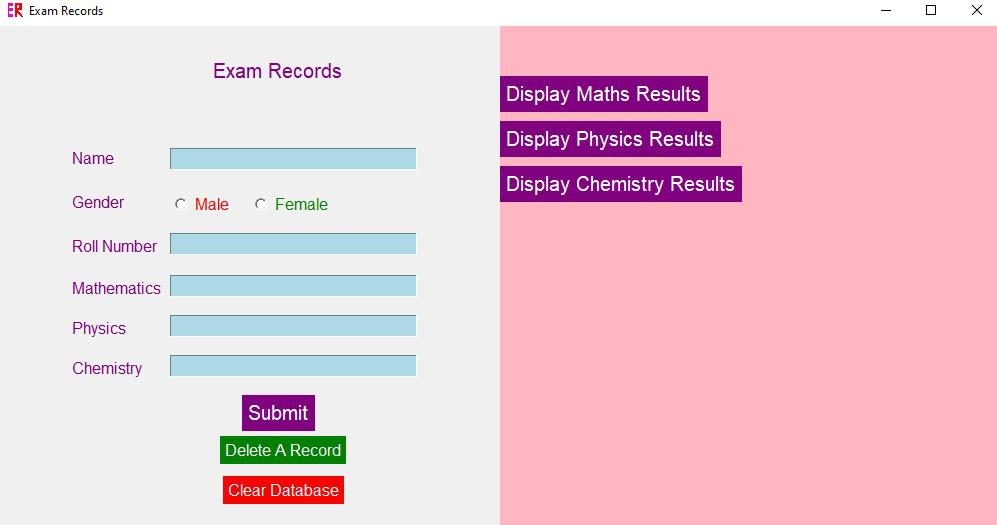
Output
Optionally we may add an icon for the application (.ico file) . Below is a screenshot of the home screen of the application.
In this article, we discussed about building a simple exam result management system using Tkinter for the GUI and SQLite for the database. This system allows you to add student records, delete specific records, clear the entire database, and display student marks sorted by subject. Further functionalities including adding graphs , exporting data to a file etc. can be added to enhance the application.