|
VOOZH | about |
|
VOOZH | about |
sys.stdout.write() is a built-in Python method that writes output directly to the console without automatically adding a newline (\n). It is part of the sys module and requires import sys before use.
Unlike print(), it does not insert spaces between multiple arguments, allowing precise control over text formatting. It returns the number of characters written instead of None. Example:
Hello, World!Gfg
Return Value: 3
Explanation:
sys.stdout.write("string")
Parameters:
Return Value: It returns the number of characters written. In interactive mode, this value may be displayed because the interpreter echoes function return values.
This example demonstrate how to print elements of a list on the same line and then on separate lines using sys.stdout.
Python is awesome
Python
is
awesome
Explanation: sys.stdout.write() prints list elements on the same line using a space and then on separate lines with \n. This avoids automatic spaces or newlines from print().
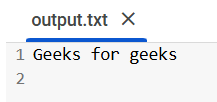
A useful feature of sys.stdout is that it can be reassigned, allowing us to redirect output to a file instead of displaying it on the console. This is particularly helpful for logging and storing program results.
Output
Explanation:
This example shows how to use sys.stdout.write() to dynamically update text on the same line, it's useful for countdowns or progress bars.
Output
Explanation:
To read about more Python's built in methods, refer to Python's Built In Methods
Understanding this difference is important for precise output control, especially in scenarios like dynamic console updates, logging or writing to files. It helps in optimizing performance, avoiding unnecessary formatting and ensuring the desired output structure in various programming tasks.
Feature | print() | sys.stdout.write() |
|---|---|---|
Auto newline | Yes (print() adds \n by default) | No (must manually add \n if needed) |
Output Formatting | Supports sep and end parameters | No additional formatting options |
Returns | None | Number of characters written |