|
VOOZH | about |
|
VOOZH | about |
Turtle is a Python module that provides a virtual drawing board where one can control a cursor (called a turtle) to draw shapes and patterns on the screen using simple commands.
To use Turtle in Python, simply import turtle (no installation needed). A basic Turtle program follows four steps:
1. Import the turtle module: import Turtle in Python in the following ways.
import turtle
or
from turtle import *
2. Create a turtle to control: After importing the turtle library, we create a drawing window and a turtle. Here, 'wn' is the window and 'skk' is the turtle.
wn = turtle.Screen()
wn.bgcolor("light green")
wn.title("Turtle")
skk = turtle.Turtle()
3. Draw around using the turtle methods: Now that the window and turtle are ready, we can move the turtle. For example, to move skk forward by 100 pixels.
skk.forward(100)
4. Run turtle.done(): This draws a line 100 pixels long in the direction 'skk' is facing. To finish the program, call.
turtle.done()
Below are some examples of Turtle programs demonstrating different shapes and patterns.
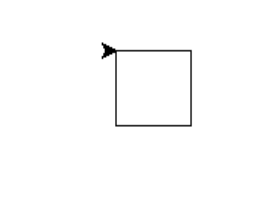
In this program, we show how to draw a square using Turtle in Python.
Output
Explanation:
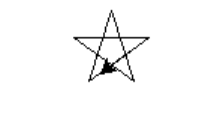
In this program, we show how to draw a star using Turtle in Python.
Output
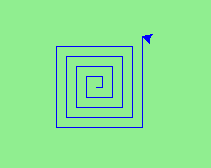
In this program, we draw spiral squares that grow outward and inward to create a visually interesting pattern.
Output
Explanation:
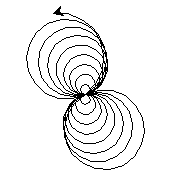
In this program, we create a spiral helix pattern by drawing circles with increasing and decreasing radii.
Output
Explanation:
Below are some common Turtle methods used to move the turtle, draw shapes and control colors.
| Method | Parameter | Description |
|---|---|---|
| Turtle() | None | Creates and returns a new turtle object |
| forward() | amount | Moves the turtle forward by the specified amount |
| backward() | amount | Moves the turtle backward by the specified amount |
| right() | angle | Turns the turtle clockwise |
| left() | angle | Turns the turtle counterclockwise |
| penup() | None | Picks up the turtle's Pen |
| pendown() | None | Puts down the turtle's Pen |
| up() | None | Picks up the turtle's Pen |
| down() | None | Puts down the turtle's Pen |
| color() | Color name | Changes the color of the turtle's pen |
| fillcolor() | Color name | Changes the color of the turtle will use to fill a polygon |
| heading() | None | Returns the current heading |
| position() | None | Returns the current position |
| goto() | x, y | Move the turtle to position x,y |
| begin_fill() | None | Remember the starting point for a filled polygon |
| end_fill() | None | Close the polygon and fill with the current fill color |
| dot() | None | Leave the dot at the current position |
| stamp() | None | Leaves an impression of a turtle shape at the current location |
| shape() | shapename | Should be 'arrow', 'classic', 'turtle' or 'circle' |