|
VOOZH | about |
|
VOOZH | about |
Server-side rendering (this practice allows making web pages since the browser only enables blank pages) can be defined as one of the current trends in web development. SSR offers many advantages – performance improvement, SEO enhancement, and even convenience for users. As opposed to client-side rendering only after the complete page is loaded, which can disappoint users with slower devices or networks, SSR allows for streaming pages during loading, which is great for the large part of the slow pages.
Below are the points to discuss in the article:
Table of Content
Server-side rendering (SSR) is a web application technique in which the HTML of web pages is generated on the server and then sent to the client. This method allows for faster initial page loads because the server prepares the content, reducing the time the browser spends processing JavaScript to render the page.
SSR significantly improves the performance and accessibility of web applications by pre-rendering the HTML on the server. This leads to faster load times and enhanced user experiences, particularly on slower devices or networks. Additionally, SSR improves the ability of search engines to index content, as the fully rendered HTML is readily available for crawling.
Alright. Instead, let’s see what is so special about its implementation that ought to come last.
Vite is an app-building tool that provides fast build and development modes. It directly utilizes the ES modules of the browser for development and then uses Rollup to bundle the code for Production. From Vite’s side, it is reasonable to use it with frameworks, like React because of the HMR HOT replacement efficiency and processing speed.
On the other hand, React.js is a component-based library for building user interfaces. React allows developers to build encapsulated components that manage their state and then compose them to make complex user interfaces more efficient through changes in data.
Together, Vite and React provide the best combination for building performant and scalable web applications.
Let’s start by setting up a new Vite project configured for React:
First, create a new Vite project by running the following commands in your terminal:
npm create vite@latestChoose the following options:
Other -> create-vite-extra -> ssr-react -> non-streaming -> javascript/typescript
 "dependencies": {
 "compression": "^1.7.4",
 "express": "^4.19.2",
 "react": "^18.2.0",
 "react-dom": "^18.2.0",
 "sirv": "^2.0.4"
 },
 "devDependencies": {
 "@types/react": "^18.2.79",
 "@types/react-dom": "^18.2.25",
 "@vitejs/plugin-react": "^4.2.1",
 "cross-env": "^7.0.3",
 "vite": "^5.2.10"
 }
npm installVite requires some configuration changes to support SSR. We will need to set up a server entry point and modify the Vite configuration file.
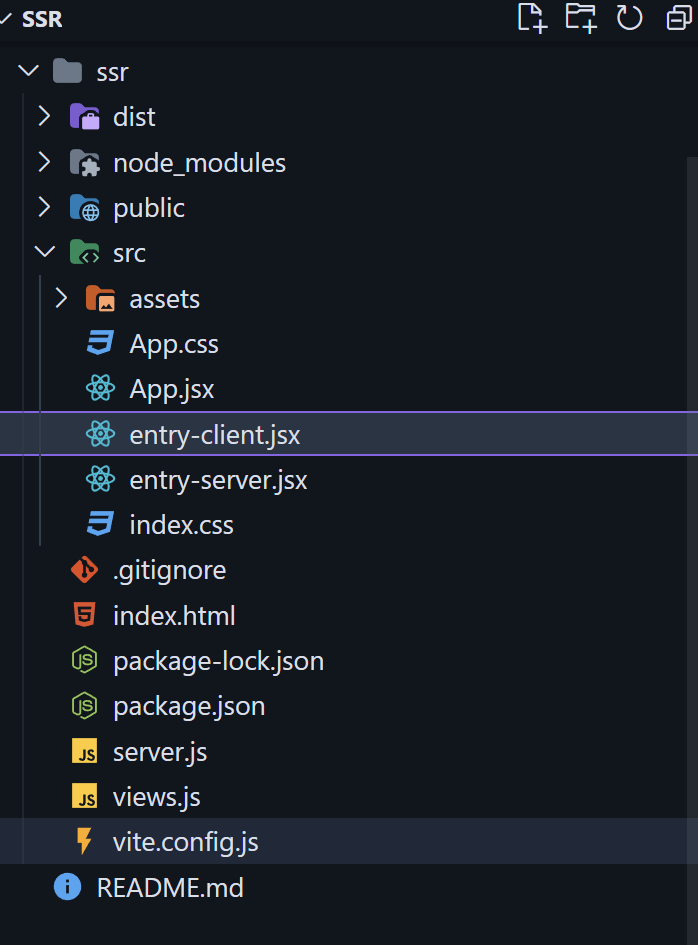
Started by creating a new file named server.js in the root of your project. This file will handle server-side rendering and serve your React application.
To implement SSR effectively, you need to set up the server to render your React components and manage routing correctly.
This basic Express server renders your React application using renderToString and serves the generated HTML to the client.
This code will sets up the entry point for a React application with server-side rendering support. It imports the necessary CSS and React libraries, then uses ReactDOM.hydrateRoot to attach the React app to an existing HTML element that was pre-rendered on the server. Wrapping the app in React.StrictMode helps identify potential issues during development by providing additional checks and warnings. The BrowserRouter component from react-router-dom enables client-side routing, allowing seamless navigation between different views without full page reloads. Inside the BrowserRouter, the Router component (imported from the local ./router module) manages the application's routes and navigation logic, ensuring a smooth and interactive user experience.
This code snippet will sets up server-side rendering for a React application. It imports necessary modules from React and React Router, specifically ReactDOMServer for rendering React components to a static HTML string and StaticRouter for handling routing on the server side.
The render function uses ReactDOMServer.renderToString to convert the React component tree into an HTML string. The StaticRouter component, which is part of react-router-dom/server, manages the routing based on the server-side location prop (though path should be defined or passed in a real scenario). The React.StrictMode wrapper is used for development checks. Finally, the function returns an object containing the generated HTML, which can be sent to the client to be rendered in the browser.
Build the Application:
npm run build
npm run build:client
npm run build:server
This command builds the client and server parts of the application.
Run the application:
npm run devYour server will start at http://localhost:5173, serving the SSR React application.
With SSR, routing must be handled on both the server and the client. On the server, use StaticRouter from react-router-dom/server to render the correct routes based on the incoming request URL. On the client side, use BrowserRouter to handle navigation without a full page reload.
This code defines a simple routing setup for a React application using react-router-dom. It imports the Route and Routes components to configure routing, and it also imports the Contact and Home components from the views directory.
The Router component sets up the routing configuration by defining a set of routes within the Routes component. It maps the root path ("/") to the Home component and the /contact path to the Contact component. This setup allows users to navigate between the home page and the contact page within the application.
Integrate state management solutions like Redux, Zustand, or Context API to manage application state across server and client. Ensure the initial state is serialized and included in the HTML sent from the server.
Must Read
Server-side rendering (SSR) is a powerful way to boost your web app’s speed, SEO, and user experience, especially for users on slower networks or devices. By sending pre-built HTML from the server, SSR helps pages load faster and become more search-engine friendly. Using tools like React and Vite makes setting up SSR easier and more efficient. While it requires some extra setup and understanding, the performance benefits and improved visibility are well worth it for modern web apps.