|
VOOZH | about |
|
VOOZH | about |
In the world of full-stack development, the MEAN stack has became one of the top choice for building dynamic and robust web applications. Web development refers to the creating, building, and maintaining of websites. It includes aspects such as web design, web publishing, web programming, and database management. This stack provides an end-to-end framework for the developers to work in and each of these technologies play a big part in developing websites of web applications. It comprises of 4 technologies namely: MongoDB, Express, Angular, and Node JS. It is designed to make the development process smoother and easier.
👁 Roadmap-to-Mean-stack-developer-copy-(1)
Table of Content
MEAN Stack is a JavaScript Stack that is used for easier and faster deployment of full-stack web applications. MEAN Stack comprises 4 technologies namely: MongoDB, Express.js, Angular.js, Node.js. It is designed to make the development process smoother and easier. It is one of the most demanded tech stack between developers for creating full fledge web applications. Although it is a Stack of different technologies, all of these are based on JavaScript language.
When working with MERN stack, developers create implement View layer using Angular, Express and Node are used to implement application layer of website then MongoDB is used to implement database layer.
Communication between these components happens via HTTP requests and responses. Angular, on the client-side, sends requests to the Express.js server, which interacts with MongoDB to fetch or modify data. The server then sends required data back to Angular for rendering.
Step 1: Learn basics of HTML, CSS and JavaScript
Step 2: Learn Angular which is a frontend library for building User Interfaces
Step 3: Learn Node JS which is JavaScript runtime environment
Step 4: Learn Express JS, a framework built upon Node.js to simplify the process of creating web application and API building
Step 5: Learn MongoDB, a NoSQL database to store and retrieve data.
There are two requirements to start a MEAN stack project:
Step 1: Install node on your system depending on your Operating System:
Step 2: You need a code editor to work with so install a code editor, preferably we will use VS Code
To setup MEAN stack we need to create a folder structure for both frontend and backend. Then we have to define database schema to store and retrieve data from the database.
Follow the below steps to create a basic structure
Step 1: After the code editor is installed, create a new project folder. Then go to the project folder in command prompt/terminal and type below commands to create folder for frontend and backend
mkdir frontend
mkdir backend
Step 2: Navigate to the frontend folder using the command
cd frontend
Step 3: Initialize and run a Angular Project using the command
npm install -g @angular/cli
ng new my-angular-app
cd my-angular-app
ng serve --open
Step 4: Now navigate to the backend folder using the command
cd..
cd backend
Step 5: Initialize the project backend using the command
npm init -y
Step 6: Install Express and other backend dependencies using the command
npm i mongodb express cors dotenv
After following all the above steps a basic structure for MERN Stack application is created.
MongoDB is a document-oriented NoSQL database system that provides high scalability, flexibility, and performance. Unlike standard relational databases, MongoDB stores data in a JSON document structure form. This makes it easy to operate with dynamic and unstructured data and MongoDB is an open-source and cross-platform database System.
Creating a database: Simply done using a “use” command:
use database_name;
Creating a table: If the collection/table doesn’t exist then a new collection/table will be created:
db.createCollection("collection_name");
Inserting records into the collection:
db.collection_name.insert
(
 {
 "id" : 1,
 "Name" : "Klaus",
 "Department": "Technical",
 "Organization": "Geeks For Geeks"
 }
);
Querying a document:
db.collection_name.find({Name : "Klaus"}).forEach(printjson);👁 Lightbox
Links to learn more about MongoDB:
Express is a small framework that sits on top of Node.js’s web server functionality to simplify its APIs and add helpful new features. It makes it easier to organize your application’s functionality with middle ware and routing. It adds helpful utilities to Node.js’s HTTP objects. It facilitates the rendering of dynamic HTTP objects.
Create a new folder to start your express project and type below command in the command prompt to initialize a package.json file. Accept the default settings and continue.
npm init
Then install express by typing the below command and hit enter. Now finally create a file inside the directory named app.js.
npm install express --save
Now type in the following in app.js to create a sample server.
Then to start the server by running the below command
node app.js
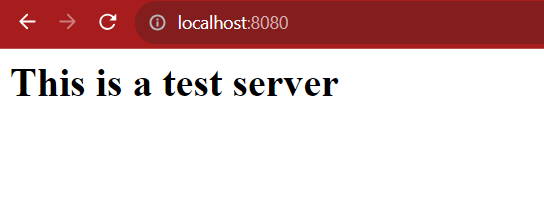
Now you can open the browser and get the output of the running server.
Links to learn more about ExpressJS:
Angular is a Front-end Open Source Framework developed by Google Team. This framework is revised in such a way that backward compatibility is maintained (If there is any breaking change then Angular informs it very early). Angular projects are simple to create using Angular CLI (Command Line Interface) tool developed by the Angular team.
Why use Angular.JS?
You can start your angular application by first installing “angualar-cli” using npm or yarn.
npm install -g @angular/cli
After that you can create a new angular app by using.
ng new my-angular-app
Now to run the application use the following command
cd my-angular-app
ng serve --open
Terminal Output:
Browser Output:
Links to learn more about Angular.js:
Node.js is used to write the Server Side Code in Javascript. One of the most important points is that it is a runtime environment which runs the JavaScript code outside the Browser. It is cross-platform and Open Source. NodeJS is not a framework and it’s not a programming language. Node.js is used to build back-end services like APIs like Web App or Mobile App.
Initialize a Node.js application by typing running the below command in the command window. Accept the standard settings.
npm init
Create a file named app.js.
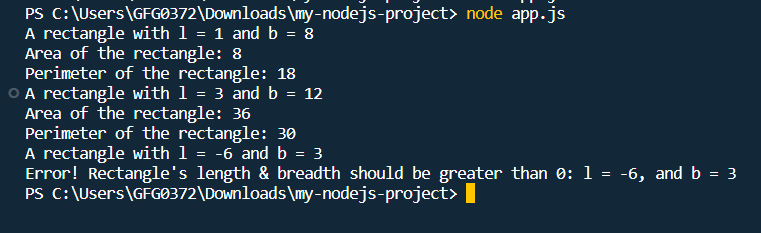
Example: A basic Node.js example to compute the perimeter & area of a rectangle.
Run the node application by running the below command in the command window.
node app.js
Output:
Links to learn more about Node.js:

.webp)