VOOZH about

URL: https://www.geeksforgeeks.org/techtips/best-video-downloaders-for-windows/

⇱ Best Video Downloaders for Windows - GeeksforGeeks


  • Courses
  • Tutorials
  • Interview Prep

Best Video Downloaders for Windows

Last Updated : 27 Sep, 2024

We are about to introduce several of the best video downloaders for Windows, discussing their practical applications, ease of use, and how to get up and running. Whether you have online videos that you want to save for offline use or even need them for some future project, the tools discussed within this article give you very effective solutions without having to go too deep into complex theory. The end mentions some of the key terminologies and some FAQs that make you more aware of how these tools work.

Primary Terminologies

  1. Batch Downloading: A feature that allows the user to download videos in bulk.
  2. Conversion: This is the process of changing the downloaded video to any other file format.
  3. Built-in Player: The ability to play or preview video downloads from within the software itself.

Types of Video downloaders

  • 4K Video Downloader
  • YTD Video Downloader
  • Freemake Video Downloader
  • JDownloader
  • ClipGrab

Explaining each Types of Video downloaders in detail

1. 4K Video Downloader

4K Video Downloader is the most in-demand video downloaders since it is capable of remembering videos, playlists, and even whole channels hosted on YouTube. It allows for high-quality downloads, including in 4K and 8K

Key Features:

  • Download entire playlists or channels
  • Supports downloading subtitles
  • Allows you to download videos in various formats (MP4, MKV, etc.)

How to Use:

1. Download and Install: Head to the 4K Video Downloader official website


2. Install the software, as shown below:


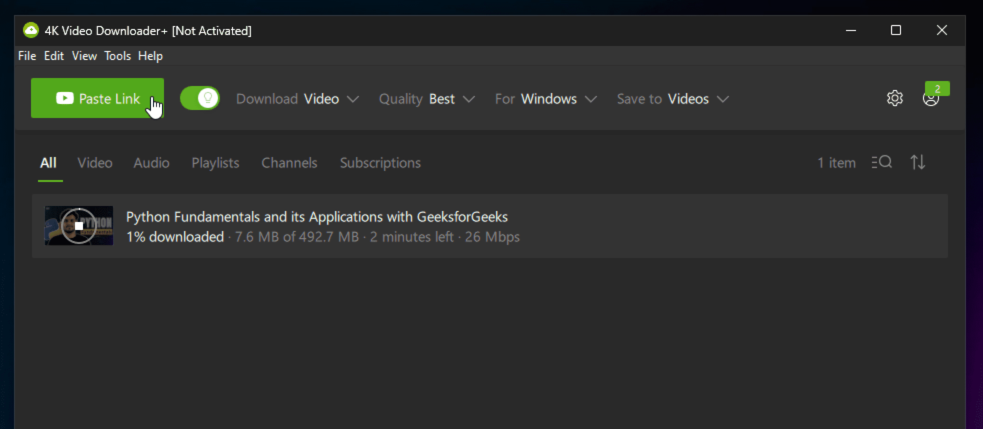
3. Copy Video URL: Copy the URL of the video you want to download and Paste URL: In the software, click the “Paste Link” button.

👁 Copy-URL--and-Paste-here

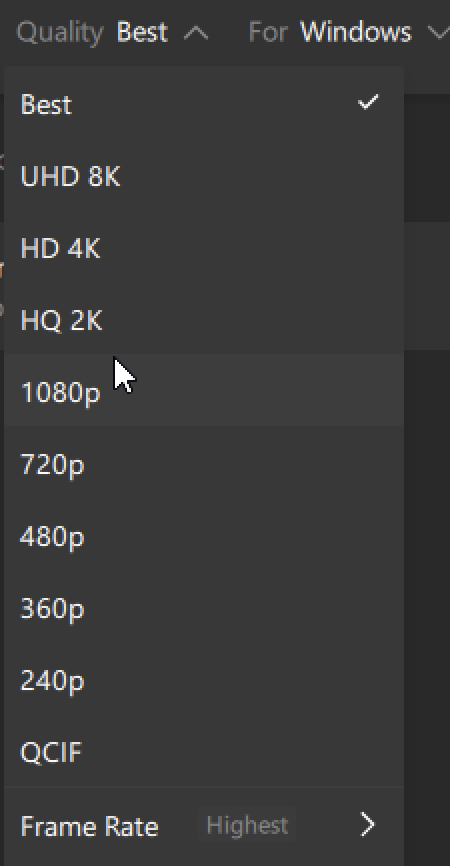
4. Choose Format and Quality: Select the format (mp4,mp3) and the resolution (upto UHD 4k).

👁 Select-Quality-and-Format

5. Download: Click the “Download” button to start downloading.

2. YTD Video Downloader

YTD Video Downloader is a light, easy-to-use application that is used to download and convert videos in any format. It contains an integrated viewer and supports several file formats

Key Features:

  • Can convert video into many different forms
  • It provides a video player to preview downloads
  • Supports several resolutions.

Steps to Use

  • Download and Install: Download YTD Video Downloader from its website
  • URL to be entered: The video URL is to be copied and pasted into this downloader
  • Format Selection: Select the format in which the output is to be obtained
  • Download: Click the “Download” button to initiate downloading

3. FreeMake Video Downloader

The FreeMake Video Downloader is somewhat versatile, offering download opportunities for over 10,000 websites, included among these sites are YouTube, Facebook, and Vimeo. Options are also available for downloading and converting videos as per user preference

Key Features:

  • Compatible with multiple website formats
  • It allows conversion to MP3, MP4, AVI, and more
  • Batch downloading is allowed with speed control

Steps to Use

  • Install Software: Download and install Freemake Video Downloader
  • Add the Video URL: Paste the video URL into the tool
  • Choose Output: Select the format of output and quality
  • Download: Click on “Download” to start it

4. Overview of JDownloader

JDownloader is an open-source download manager. It supports a wide range of platforms, including those for video hosting. It has been highly customizable, with batch downloads and the ability to pause and resume them

Key Features:

  • It offers support for downloading from various video platforms.
  • Offers batch downloads and advanced management features.
  • Free Open Source.

Steps to Use

  • Install JDownloader: Download and install JDownloader from its website
  • Copy Video URL: Once the video URL is copied, it will automatically be detected by JDownloader
  • Start Download: Once the format and quality have been selected, click on “Start Download”

5. ClipGrab Overview

ClipGrab is an open-source, completely free-of-cost video downloader for a wide array of video hosting sites, such as YouTube, Vimeo, and Daily motion. It boasts a fairly simple interface that also allows users to convert downloaded videos into several other formats

Key Features:

  • Allows download from popular host.
  • The conversion of videos to MP3, MP4, WMV, and more with this software is cool
  • Very simple and intuitive interface

Steps to Use

  • Download and Installation of ClipGrab: Go to the ClipGrab website and download the app
  • Search or Paste URL: You can either directly paste the URL of the video or search for the video inside the app
  • Choose Format: First, you need to select the format and resolution in which you want the video downloaded
  • Start Download: Click on the button saying, “Grab this clip!”

Conclusion

Of course, video downloaders are very handy options that allow users to save online videos distributed across several platforms operating on Windows. These options indeed provide you with high-quality 4K downloads, an in-built video player, and converter facility to manage and access your favorite content with great efficiency.

Comment
Article Tags: