|
VOOZH | about |
|
VOOZH | about |
If you’ve encountered Error 1061: The service cannot accept control messages, you’re likely dealing with a Windows service issue that prevents certain system functions from executing properly. This error typically occurs when a service is in an unresponsive state or there’s a conflict with its control messages. In this guide, we’ll cover how to fix Error 1061 and provide steps to resolve the service cannot accept control messages issue in Windows, ensuring your services run smoothly again.
Table of Content
Error 1061 occurs when there is a response error to the requests made from Windows 10/11. As mentioned earlier, network issues may cause Application Services in the System to fail to respond, causing Error 1061.
Another layer of this error is due to network issues, or any of the other issues mentioned above, there may be a mismatch in network packets over the control of the core service when the state and core control mismatches.
Some of the common causes of Error 1061 are:
Now you know why Error 1061 comes, but how do you fix this error when it appears in your system? You can go through a few methods on how to solve this problem below.
There are an array of methods you can use to fix Error 1061. Let’s go through these methods in detail. Starting with the first method i.e. Restart the Credential Manager Service.
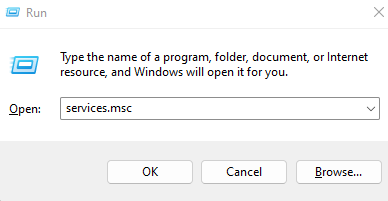
Step 1: Open the Windows Run by pressing the Windows Key and R at the same time. In that open the services running window and type the command as follows:
services.msc
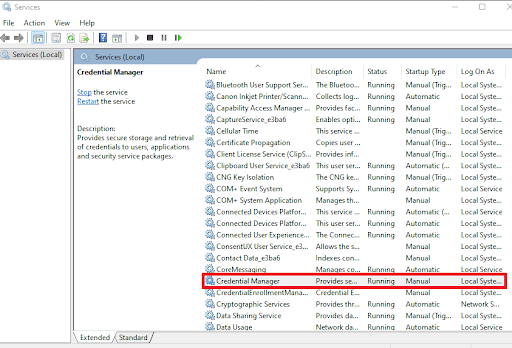
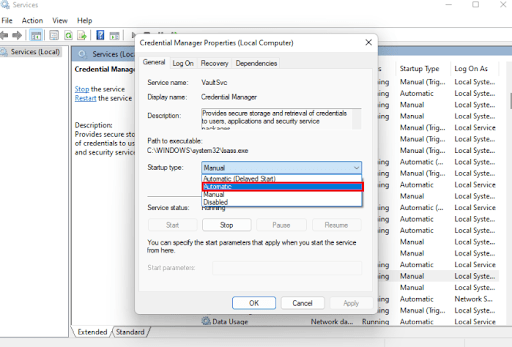
Step 2: Scroll down and find Credential Manager in the services. You need to see its properties. To do so, double-click on it.
Step 3: This will open the Properties window of the Credential Manager. Now, in the startup type, select Automatic.
Step 4: Run the manager again by clicking Start and click the Apply button and then the OK button to save the changes.
This will solve the Error 1061 problem caused due to disabling Credential Manager.
Sometimes, Error 1061 occurs when the Application information service is not running or is disabled for some reason. The Application Information Service usually runs many system applications with additional administrator privileges.
When disabled, some essential applications may not be given access to the admin system. Thus, when run, it may display 1061. Fortunately, checking whether the Application Information Service is running or not is a simple task. To check that follow the following steps:
Step 1: Similar to Method 1, we need to navigate to the Services window. Press Win and R to open the services page.
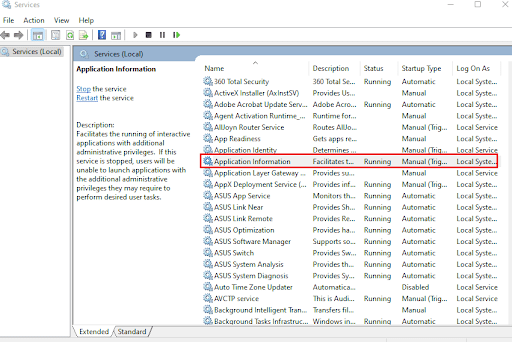
Step 2: In the services window, we need to view the properties of the Application Information Service to fix the error.
👁 Application-Information-Service
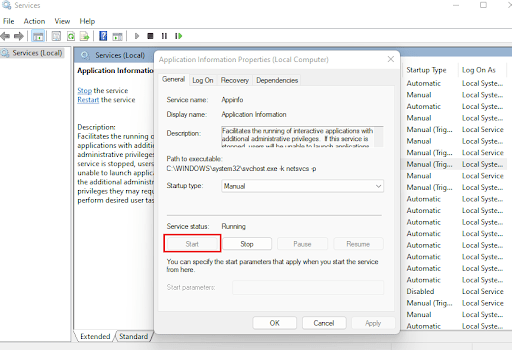
Step 3: After finding it, double-click on the service to open the Properties window. Now, click the Start button if it is not running in the Properties Window.
👁 Application-Information-Properties
Step 4: Apply and save these changes. Other than the Application Information Service, similarly, check whether these other systems are running. If they are not, start all of these programs as shown below:
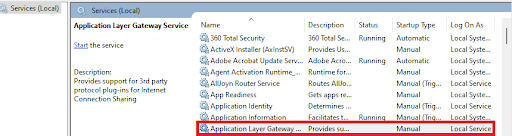
1. Application Layer Gateway Service
👁 Application-Layer-Gateway-Service
2. N/W (Network) Connections
3. NLA (Network Location Awareness)
👁 NLA-(Network-Location-Awareness)
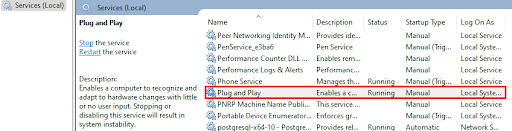
4. Plug and Play
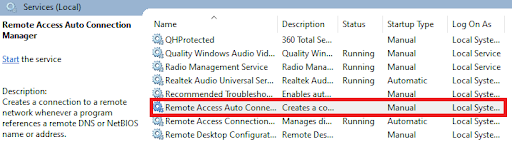
5. Remote Access Auto Connection Manager
👁 Remote-Access-Auto-Connection-Manager
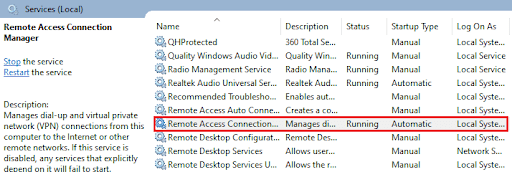
6. Remote Access Connection Manager
👁 Remote-Access-Connection-Manager
7. RPC (Remote Procedure Call)
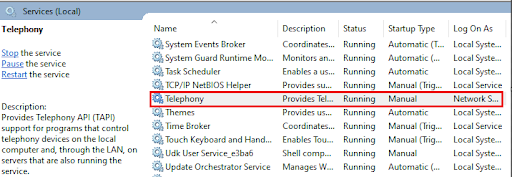
8. Telephony
After running all these services, Error 1061 will not persist and be solved. All these applications work on the network and provide admin privileges to applications. Hence, they are given access to almost everything in the Windows system.
IMPORTANT: Close all the property tabs after you’re done, or else, the services window will not close.
Resolving Error 1061: The service cannot accept control messages is crucial for ensuring that your Windows services function correctly. By following the troubleshooting steps provided, you can efficiently fix Error 1061 and restore normal operation to your system. Regular service maintenance and monitoring can help prevent this error from recurring and keep your system running smoothly.
Also Read

-Connections.png)
.png)
.png)