|
VOOZH | about |
|
VOOZH | about |
Clearing the cache in your web browser can significantly improve its performance and help resolve various browsing issues. If you're using Firefox, knowing how to clear the Firefox cache is essential for maintaining optimal browsing speed and functionality. This article will walk you through the steps to delete theFirefox cache, ensuring a smooth and efficient browsing experience. Whether you're troubleshooting loading problems or simply doing routine maintenance, learning to clear the browser cache in Firefox is a valuable skill.
Table of Content
Browser cache stores our online activities but it is important to clear browser cache timely. To remove Cache Data in Firefox, the following methods can be used one by one. We will start with the simple method from the Privacy Settings.
Step 1: Open Firefox Settings, and click on Privacy & Security.
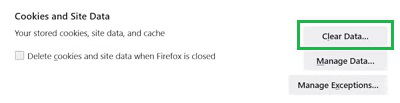
Step 2: Under Cookies & Site Data, click on the Clear Data.
Step 3: Only mark the Cache Option & click on the Clear button.
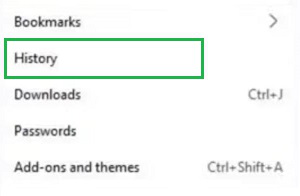
Step 1: Go to the Three Dots on Firefox Homepage, and click on the History option.
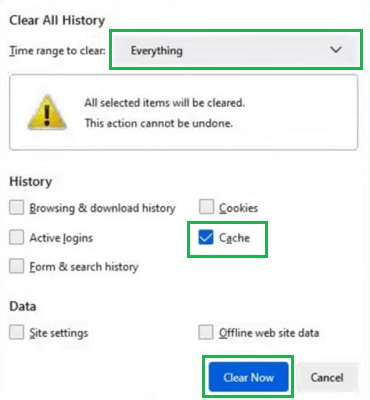
Step 2: Mark only Cache under the Everything Time Period & click on Clear Now.
Step 1: Open the Firefox application, click on the Three-Dots & go to the Settings.
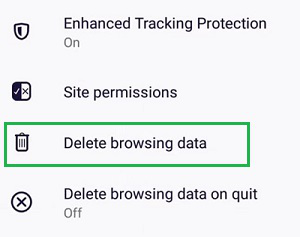
Step 2: Click the Delete Browsing Data option.
Step 3: Mark only the Cache option & tap on the Delete button.
So, from the above discussion, it might become clear the process to Delete Cache Memory on Firefox. It is recommended to practice this process frequently after a few intervals. If you Delete Firefox Cache, you can see the browser performance is increased to some folds. That will ultimately help you to surf on internet.
Regularly clearing the cache in Firefox is a simple yet effective way to maintain your browser's performance and troubleshoot potential issues. By following the steps outlined in this guide, you can easily clear the Firefox cache and keep your browsing experience smooth and efficient. Remember to make this a routine practice to ensure your browser remains in top condition.