|
VOOZH | about |
|
VOOZH | about |
On any Operating System, we can Download & Install Firefox Browser. Many individuals assume that Installation of Firefox on Windows is relatively easier as we have only to install the EXE File. However, Installation of Firefox on Mac is not also a challenging task. We can Download & Install Firefox on Mac with simple steps.
In this article, we will discuss the steps required for Having Firefox Browser on Mac OS without having any kind of implications.
Firefox is one of the most popular Web Browser after Google Chrome in the Web Browser Market. Firefox is an open-source browser that can be installed on any kind of operating system. Despite having a lot of Differences Between Firefox & Chrome, users prefer Firefox Installation on Different OSes for its High Performance, Security, and Beautiful Customization.
Step 1: Browse to the Official Firefox Page & click on the Download Firefox button.
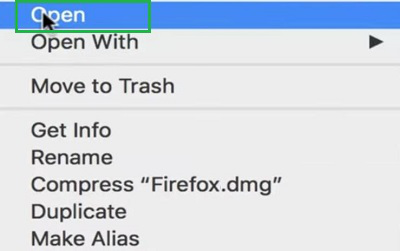
Step 2: Open the Downloaded DMG File.
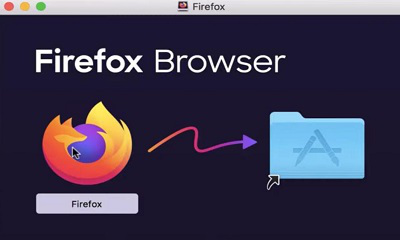
Step 3:Drag & Drop the Firefox Browser to the Application Center.
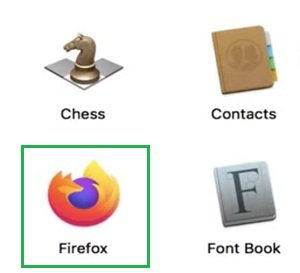
Step 4: Firefox will be installed on the device. Open the Installed Firefox.
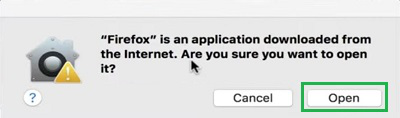
Step 5: Click on the Open Button to launch the Firefox.
So, as we can see these are the simple few steps we have to perform on the Mac Operating System for the Firefox Browser Installation. After successfully Configuring Firefox on the thatMac operating system, browse to your favorite webpage & check the interface. So, follow the above-mentioned steps properly & install your New Browser on Mac after Safari Browser.
Firefox is a web browser that is popular for its speed, security, and customization possibilities for users. The approach is easy to follow if a Mac user wants to install Firefox for the first time or wants to switch to another machine. Use Firefox as a new web browser to experience a quick, safe, and customizable browsing process for better implementation.