|
VOOZH | about |
|
VOOZH | about |
The 0xc004f015 activation error is a Windows error that happens when attempting to activate Windows 10 Enterprise using a Microsoft Windows Server KMS (Key Management Service) host.
Error code 0xc004f015 usually occurs when trying to activate Windows 10 Enterprise using a KMS (Key Management Service) host. This issue typically arises due to mismatched keys, system file corruption, or incorrect configurations.
👁 How-to-Quickly-Fix-0xc004f015-Activation-Error
The 0xc004f015 activation error message indicates explicitly that the KMS specified cannot be used for activation. The Key Management Service is a service provided by Microsoft primarily designed for organizations to activate multiple computers within their network efficiently. KMS activation offers several advantages for large-scale deployments, making it a popular choice for businesses and educational institutions.
The 0xc004f015 activation error is a common issue in Windows that can prevent your operating system from activating properly. To understand this error better, let's discover the potential causes in more detail:
Key Management Service (KMS) is a method used by organizations to activate their Windows operating systems. If you're using a KMS host product key that is incorrect or has expired, it can trigger the 0xc004f015 error. Ensure that you are using the correct and up-to-date KMS host product key for your organization or system.
Windows maintains an activation token file that contains information about your system's activation status. If this file becomes corrupted or damaged, it can lead to activation errors, including the 0xc004f015 error. Corruption can occur due to various reasons, such as unexpected system crashes or file system issues.
System files are vital for the proper functioning of Windows. If any of these files become corrupted, it can disrupt the activation process and result in error 0xc004f015. System file corruption can happen due to malware infections, hardware failures, or unexpected system crashes.
There are a couple of things you can try to fix the 0xc004f015 activation error:
Make sure that you are using the correct KMS host product key for your version of Windows. You can find the correct KMS host product key on the Volume Licensing Service Center (VLSC).
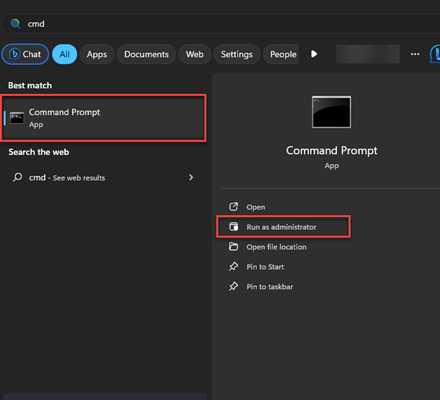
To rebuild the activation token file, follow these steps:
👁 How-to-Quickly-Fix-0xc004f015-Activation-Error01
👁 How-to-Quickly-Fix-0xc004f015-Activation-Error02
The SFC and DISM tools can scan for and repair corrupted system files. To run the SFC and DISM tools, follow these steps:
👁 How-to-Quickly-Fix-0xc004f015-Activation-Error03
Sometimes in rare cases, drive errors can also cause activation errors because the activation files are corrupted on specific sectors of drive especially hard drives. So, you have to correct this issue first. Its also suggested that change the drive immediately before you face a complete data loss.
If none of the above solutions work, it's best to contact Microsoft Support for personalized help. They can provide advanced diagnostics and fix activation issues that require backend intervention.
The 0xc004f015 activation error is typically caused by mismatched KMS keys, corrupted system files, or issues with activation tokens. Fortunately, with the right troubleshooting methods like using the Activation Troubleshooter, verifying your product key, or running SFC and DISM you can often resolve the issue on your own.