 |
VOOZH | about |
|
VOOZH | about |
ChatGPT has smoothly become an important part of pretty much everyone’s life. The revolutionary AI chatbot has become a go-to tool that assists millions of people in generating blogs, emails, codes, captions, and almost every kind of written content. However, there are times when the chatbot displays several kinds of errors. One such common error that you might have encountered in ChatGPT is the “Error in Body Stream”. This kind of error can occur due to many reasons.
👁 How to Fix ChatGPT "Error in Body Stream"
Let’s understand what kind of an error this is and how you can fix the ChatGPT Error in the Body Stream with a few easy methods.
ChatGPT’s "Error in Body Stream" means when the API request is entered in the ChatGPT, the system cannot generate the response as the body form of the request appears incorrect or malformed. In simple words, it typically means that when the ChatGPT is prompted to generate a response, the system fails to formulate the required response due to unsuccessful encoding. It is one of the most common errors users face in ChatGPT due to network problems or ChatGPT’s internal server issues.
What causes this error in ChatGPT? This error can occur when there’s an interruption while entering the prompt in the system or during the processing of the request.
Some of the common causes of this error are:
Certain ways indicate the upcoming ChatGPT “Error in Body Stream”. Some of the symptoms of the “Error in Body Stream” are:
As in ChatGPT, the error in body stream can occur due to multiple reasons, it is not always possible to fix ChatGPT error in body stream by oneself. But if the error occurs due to reasons like network issues or system malfunctioning, here are a few quick fixes you can try out that can fix the error for you:
You can try simply regenerating the response option that is displayed at the bottom of the screen. When the system responds with an answer, a regenerate option is displayed to enable the users to ask the chatbot to give another response to the same query. You can try using this method to fix ChatGPT error in body stream when the error is shown.
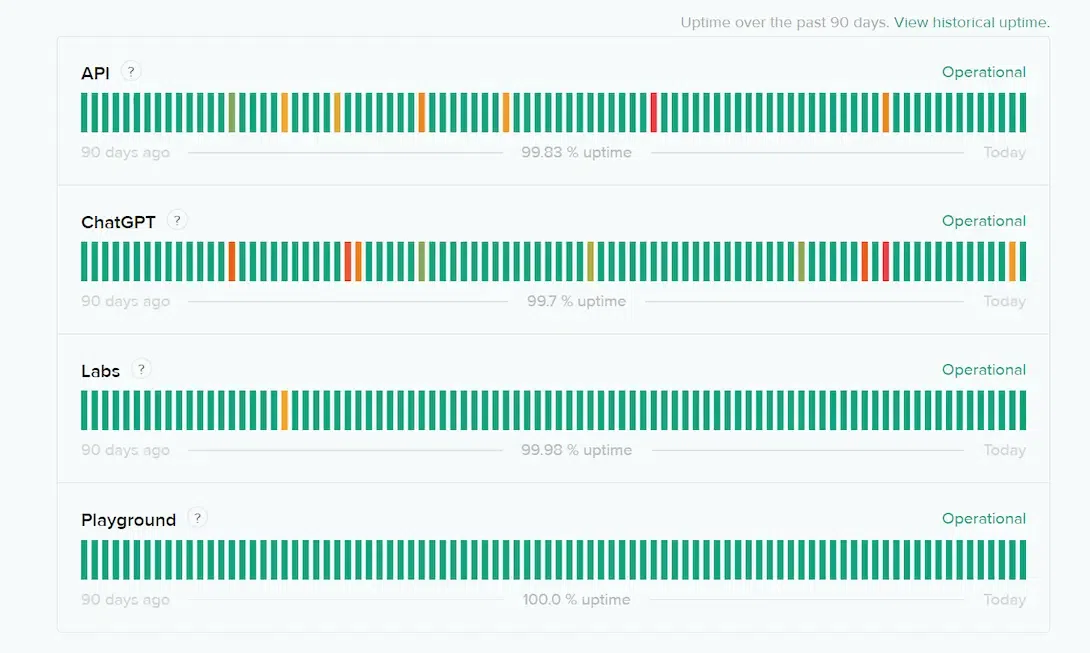
In cases when the ChatGPT server being down is the reason behind the error, you may consider cross-checking the same. Visit the OpenAI status page (https://status.openai.com/) and check under the “ChatGPT” category if the site is operational or there’s a downtime.
Starting a completely new chat in the ChatGPT can help you to eliminate the “error in body stream”. Click on the New Chat option on the top left corner and then try resending your prompt to the chatbot. Hopefully, this may fix the error for you in case it existed due to a bugged chat.
There might be a network connection error from your end thus restarting your router might be able to fix ChatGPT error in body stream that is displayed. It will also delete any corrupt data that’s stored in the router which might be the reason behind the error. All you need to do is turn off the router, wait for 10 seconds, and restart it. Also, there might be a possibility that your internet network may be down thus it's better to confirm the same through your internet provider.
The cache files on your browser might be causing a hindrance to the proper functioning of ChatGPT. Clearing the browser history will probably fix the error for you. Go to your Browser Settings> Privacy and Security> Clear Browsing Data. Make sure you have selected only the Cached images and files and your preferred time range. Click on Clear Data and the cache files from your browser will be deleted.
Sometimes, if you enter a prompt with a huge word count, the system is unable to process it. Try writing shorter queries to allow the system to process it and display the desired output instead of displaying an error message.
Here are a few tips that can help you avoid the ChatGPT "Error in Body Stream:
Even though ChatGPT, the AI tool by OpenAI has managed to grab the eyeballs for its excellent services, it is not flawless or perfect! The tool keeps going through its phases and the users witness certain errors within the tool. The ChatGPT "Error in Body Stream” is one such expected error that can be irritating. But you can fix ChatGPT error in body stream by following the popular methods we have mentioned in this article. However, if nothing works out, you might also consider contacting the ChatGPT customer support service.

.png)
.png)