|
VOOZH | about |
|
VOOZH | about |
If you have been using any Web Browser like Google Chrome for a long time & recently switched to a new Web Browser like Firefox, then you should want all of your Saved Data, Bookmarks, History, Saved Passwords, etc. on your new Firefox Browser. To simply do such jobs, you can use Import Login Data on Firefox.
On every web browser, there is a feature that helps to Import Saved Data from the Web Browser to the HTML File. That HTML File will be used on other Web Browsers to get all the information promptly. However, the Firefox Web Browser has an additional option that will not Require HTML File Generation for Importing Login Data.
This article is intended to focus on the steps to Import Data in Firefox in different manners in no time.
To Get Login Data in Firefox, there are two main methods are present. Let us start with the HTML File Importing Process to Firefox.
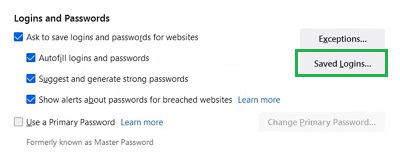
Step 1: Open Firefox Settings & go to the Privacy & Security. Under the Logins & Password, click on the Saved Logins.
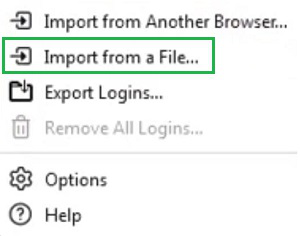
Step 2: Now, select the Import From A File option & select the HTML File.
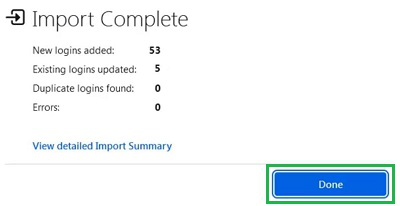
Step 3: It will take time & upload all the imported data. Once completed, click on the Done button.
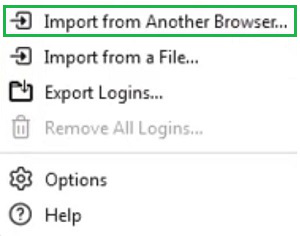
Step 1: From the Saved Logins Settings, click on the Import From Another Browser option.
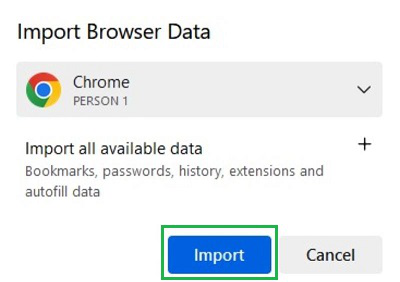
Step 2: The Web Browser will automatically selected, click on the Import Button.
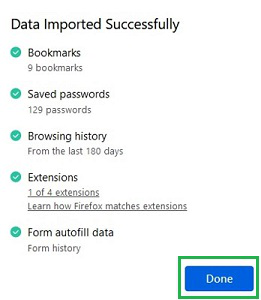
Step 3: Click on Done when the process will be completed.
So, from the above discussion, we can conclude that Getting Login Data on Firefox is not a difficult task to complete. You can either use the HTML File from other Web Browsers to Generate Login Data in Firefox. Or the best way to use the Another Web Browser Option in Firefox, where no HTML File from Web Browser will be needed.