|
VOOZH | about |
|
VOOZH | about |
There are many apps available today that can be used for messaging. The most popular option today is WhatsApp. It is being used by a large number of people today. It has captured the market today and has become the leading platform when anyone wants to talk to their loved ones. Many businesses have completely shifted their business to WhatsApp and that creates the necessity to set up passkeys on your WhatsApp account.
👁 How to Set Up Passkeys on your WhatsApp Account
With facilities such as high-quality video calling, audio calling, and voice notes, as well as an easy-to-use interface, WhatsApp is the ideal choice for many today. It is also a much safer option when we compare it to the other messaging options available. It is a product of Meta Inc., which is the parent company of Facebook. It has been a pioneer in the world of social media and is growing continuously and finding new users. Read this article to learn how you can set up Passkeys on Your WhatsApp Account.
Set Up Passkeys on Your WhatsApp Account
WhatsApp has always been quite serious about the security of its users. The company Meta Platforms Inc., which owns WhatsApp, also owns other platforms such as Instagram and Facebook. They are quite an older player in the world of social media and, hence, are well aware of the world of social media. They know how much a user cares about privacy. They understand that any user of any social media platform, after being a long-time user of the platform, wants the platform to care about their privacy.
Any user wants to feel secure about their confidential data that is present in the messaging app in the form of either media or text chats. For this, WhatsApp has, from time to time, introduced features that have been catered to the domains of security and privacy. They have introduced features such as two-step verification, fingerprint lock (which works with phones having a fingerprint sensor), and a high level of encryption between the users. Recently, it has come up with another feature to ensure the privacy of its users. The feature is known as passwords/passkeys.
Below are the steps to set up passkeys on your WhatsApp account:
Step 1: Unlock your phone and open WhatsApp.
Step 2: You'll be greeted by a chat screen that has all your chats available.
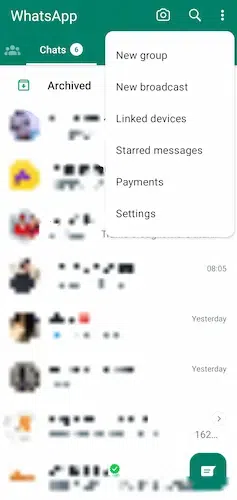
Step 3: Click on the three dots on the corner of your WhatsApp above the Calls option.
Step 4: A slide with different options will open.
👁 Get the list of options after clicking three-dots
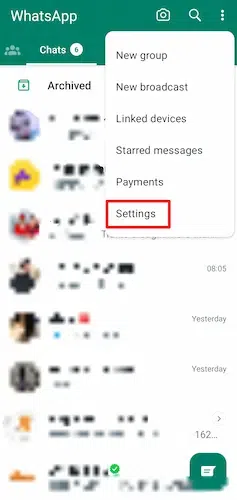
Step 5: Now touch on the Settings option on the list, which is available at the end of the list.
Step 6: You'll enter the Settings option in your WhatsApp account.
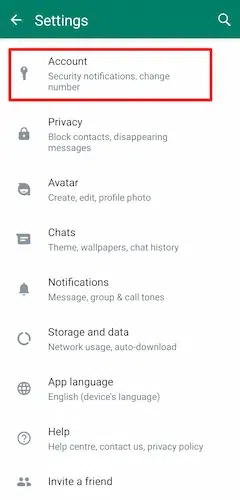
Step 7: Now, click on the Account option, which is just below your profile picture.
Step 8: You'll find the option of Passkeys.
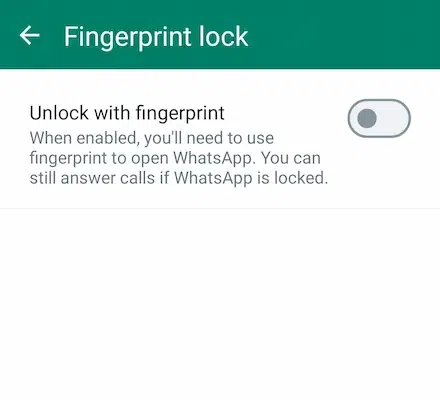
Step 9: Now choose the option that you consider good for you, like a fingerprint, facial recognition, or a pin.
👁 Use any lock method like fingerprint
Now you can use the passwords to log into your WhatsApp account with extra security.
Passkeys are a new way to set up security for your phone. It is a new option, and many phones still don't have this feature as it is still rolling out. For features like this, it is important to know about them. Now, many people might wonder why there is a need to use a passcode or any security like this. Privacy is important for many people.
The people you talk to, your personal life, and your professional life, having something like a passcode is a great way to ensure your privacy. If you don't have any privacy settings for your account, it is not good for your security. You might have some work-related information that is protected by the company; we must take care of sensitive information like that.
Here are some points to remember:
After you are done setting up Passkeys, you can use them to log in on your phone. It is a much better way than using any app lock, as passwords are a much faster and safer option that is given by WhatsApp itself. The passcode can be found in the account section of settings in WhatsApp. You have the option of setting up either a PIN or a fingerprint.
You don't need to follow any additional steps to set up the login, apart from the steps provided above. It depends on what you find easy. Having a fingerprint as a passcode is a quicker option, as you just need to touch the sensor, and your WhatsApp will be unlocked. You can also try the face recognition option, but it is not a good option when compared to a fingerprint. It is ultimately a matter of what you find easier and more secure.
Now that you have set up the Passkey on your phone but want to remove it, you can revoke it anytime you want. It is quite easy to revoke the Passkey. You might be having some difficulty with passwords or want to use another method of security, but you can still have passwords removed. The process is quite simple.
So don't worry about revoking the Passkeys, as it is even easier than having to set them up in the first place.
Passwords are a better and more secure option but passcodes offers several advanced features along with strong security. They will eventually replace the old-type passwords. With the update reaching more and more people, it will soon be the preferred option for those who use WhatsApp. This is because setting up a passcode is much easier. You have this feature built into the app itself. Previously, for setting up passwords, people used to install certain apps that used to lock WhatsApp.
These apps used to occupy quite a space on your phone and were third-party apps. These apps required a large amount of permission to work. Not only were they quite unsafe, but it was also a time-consuming process to set up these apps. With passcodes, you are free from this. The variety that the passcode gives is also a plus.
You can set up facial recognition or a fingerprint as your login code. It makes it more secure, as having your face scanned or your fingerprint taken without your involvement is not possible. It adds a personalized level of security to your WhatsApp account. All of these points make passwords a better option than using passwords. The passcode will ultimately become the main option, even on the other messaging apps.
Having a passcode is a great way for you to secure your WhatsApp account. It is an easy way given by WhatsApp itself to secure your account. Setting it up and using it is quick and easy to learn. You also get the option of choosing your method of passcode. You can have a fingerprint or a typical password pin.
By following the steps above, you can have it set up in just a few minutes. It is another great offering by WhatsApp that makes it different from the options available in the app market. This feature can be added to other messaging apps, as WhatsApp is one of the leaders in the instant messaging domain. WhatsApp will continue to have its dominance by providing features like this.