|
VOOZH | about |
|
VOOZH | about |
The Profile Manager on Firefox is a powerful tool that allows you to manage multiple user profiles on your browser. Whether you want to create Firefox profiles for different tasks or switch profiles in Firefox for various users, the Firefox Profile Manager makes it easy to customize your browsing experience. In this guide, you'll learn how to use Profile Manager on Firefox, how to open Profile Manager in Firefox, and how to manage your Firefox profile settings efficiently.
Think of the Firefox Profile Manager like having different user accounts on Windows. Each Firefox profile has its own separate settings, bookmarks, history, extensions, and preferences. This is useful for:
To Use the Firefox Profile Manager system, you have to understand the following guidelines. We will start with the simple Profile Creation Process.
By using this method, users can understand how to use the profile manager on Firefox.
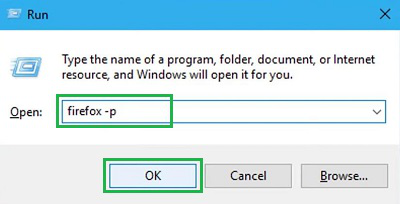
Step 1: On the Windows Run Terminal, execute the command Firefox -p to open Profile Manager. Click OK.
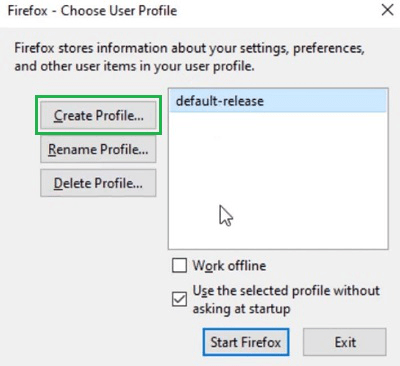
Step 2: Click on the Create Profile Option.
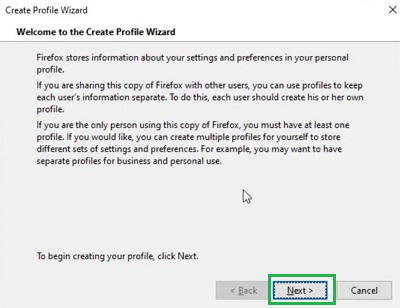
Step 3: Click on the Next to move ahead.
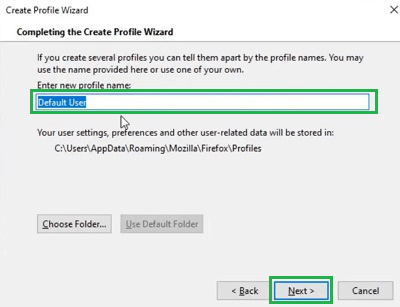
Step 4: Provide Username & Click Next to complete the process.
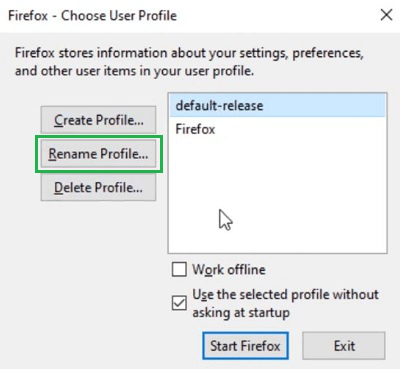
Step 1: Select the Profile whose name should be changed. Click on the Rename Profile option.
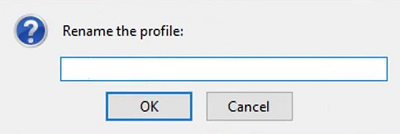
Step 2: Enter a New Name & select OK.
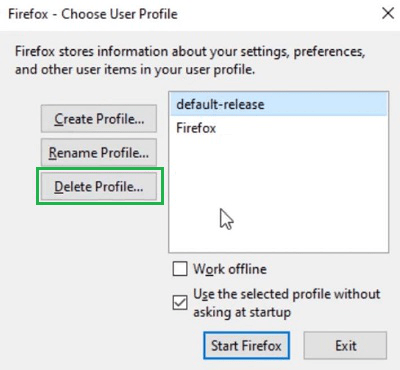
On the Profile Manager, select the Profile Name & click on the Delete Profile option. It will delete the created Profile on Firefox.
So after discussing the details of the Profile Manager Feature of Firefox, we can understand the Working Process of Profile Manager doesn't follow a complicated way.
Using the Firefox Profile Manager is an excellent way to separate browsing environments for work, personal use, or specific projects. With this tool, you can easily create Firefox profiles and manage profiles on Firefox without having to install multiple instances of the browser. By learning how to launch Firefox Profile Manager and configure multiple profiles, you can ensure that your browsing experience is organized and tailored to your needs.
Also Read