|
VOOZH | about |
|
VOOZH | about |
Sending emails directly from your website, application, or custom software is a common requirement for modern digital products. For small-scale use cases, Gmail’s SMTP server provides a simple and free way to send emails without relying on paid third-party services.
Due to updated security policies by Google, Gmail SMTP no longer supports traditional password-based login.
To use Gmail SMTP, you must:
The “Less Secure Apps” feature was fully removed in 2025, making App Passwords mandatory for SMTP access.
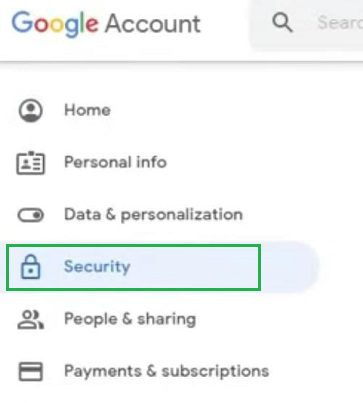
Step 1: Go to your Google Account → Security
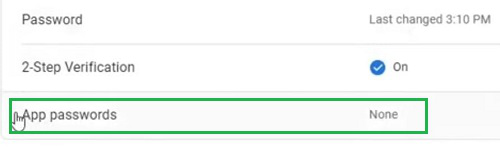
Step 2:
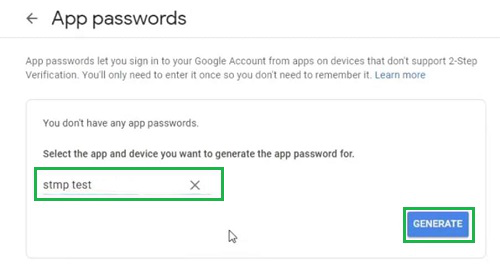
Step 3: Select:
👁 3--Sample-Name-&-Click-Generate
Step 4: Click Generate
Note: Copy the 16-character password (it will not be shown again)
In your website, app, or CMS (e.g., WordPress SMTP plugins), enter:
After configuration, send a test email to verify everything is working correctly.
Use the following settings to configure Gmail SMTP in your application:
| Field | Recommended Value |
|---|---|
| SMTP Server | smtp.gmail.com |
| Port | 587 (TLS) (recommended) |
| Alternative Port | 465 (SSL) |
| Security | TLS (STARTTLS) / SSL |
| Username | Your full Gmail address |
| Password | App Password (not Gmail password) |
| From Email | Same as Gmail address |
| Authentication | Required |