|
VOOZH | about |
|
VOOZH | about |
Spring Cloud Config provides both server and client-side support for externalized configuration in distributed systems. The Config Server manages configuration properties for applications across various environments, allowing them to retrieve their configuration from a central location. By default, Spring Cloud Config Server uses a Git repository to store configuration files, but it can be customized to use other storage locations such as local file systems, SVN repositories, or databases.
Spring Cloud Config Server acts as a centralized configuration server for distributed systems. It allows multiple applications to share configuration properties stored in a single location. By default, it uses a Git repository to share these configurations, but you can customize the storage location to meet your needs. Customization options include local file systems, SVN repositories, and relational databases.
This article will guide you on how to customize the configuration location in the Spring Cloud Config Server.
my-app with the profile dev requests its configuration.my-app and dev in the specified backend (e.g., Git repository, local file system).This process allows for centralized management and version control of configuration properties, making it easier to handle different environments (development, testing, production). It ensures consistency across distributed applications.
These files in the Config Server application specify the backend storage location and other configuration details. For example, if using a Git repository, you would configure the application.yml as follows:
server:
 port: 8888

spring:
 cloud:
 config:
 server:
 git:
 uri: https://github.com/your-repo/config-repo
 searchPaths: config
server.port: The port on which the Config Server will run.spring.cloud.config.server.git.uri: The URL of the Git repository containing configuration files.spring.cloud.config.server.git.searchPaths: The path within the repository where configuration files are located.The client application has an application.yml file that specifies the Config Server URL and other necessary details to connect to the Config Server.
spring:
 cloud:
 config:
 uri: http://localhost:8888
 name: my-app
 profile: dev
spring.cloud.config.uri: The URL of the Config Server.spring.cloud.config.name: The name of the application requesting configuration.spring.cloud.config.profile: The profile of the application (e.g., dev, prod).By customizing the configuration location in Config Server, we gain flexibility in how and where we store the configuration properties. This allows us to adapt to various project requirements and infrastructure setups.
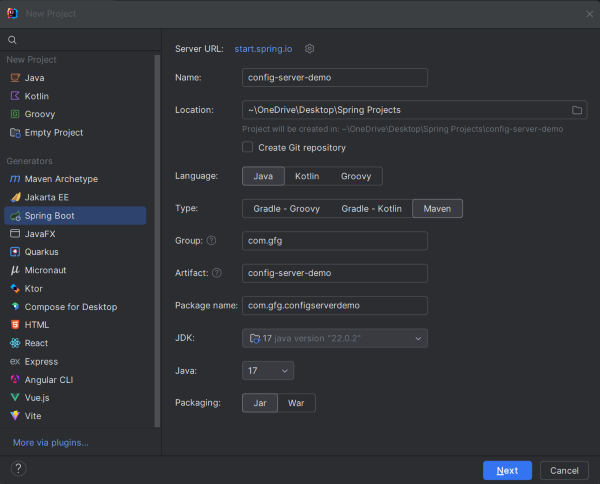
Create a new Spring Boot Project using IntelliJ IDEA with the following options:
Click on the Next button.
Add the following dependencies to the project:
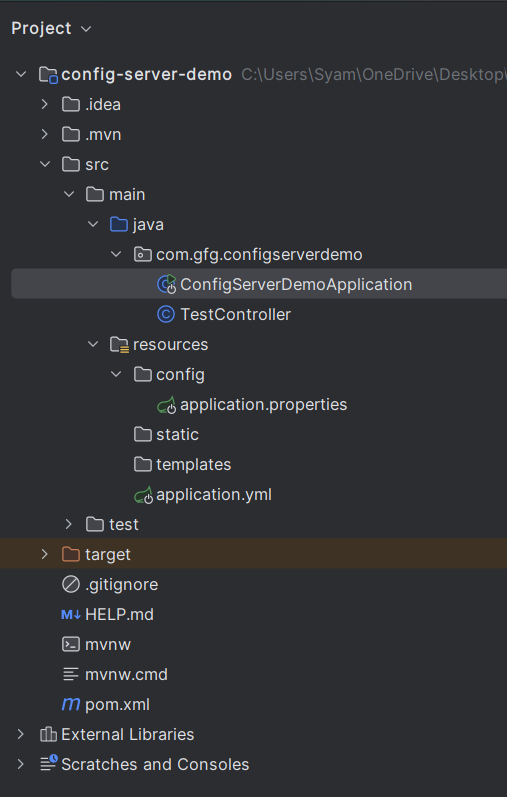
After the project creation done, the folder structure will look like the below image:
Create a new application.properties file in the config folder under src/main/resources:
Go to src > resources > config > application.properties and put the below code.
message=Hello from the Config Server!Then, create an application.yml file and add the configuration code for the Config Server:
spring:
 cloud:
 config:
 server:
 native:
 searchLocations: classpath:/config
Create a simple endpoint for the project. Go to src/main/java/com/gfg/configserverdemo/TestController and add the following code:
Open the main class and add the @EnableConfigServer annotation to activate the Config Server functionalities:
Ensure your pom.xml includes the necessary properties and dependencies:
Once the project is complete, start the application. It will run on port 8080.
Test the endpoint using Postman or any other tool:
GET http://localhost:8080/testCustomizing the configuration location in the Spring Cloud Config Server allows you to store configuration properties in various backends like Git, local file systems, or databases. This flexibility ensures that you can manage configuration properties in a way that best fits your project requirements.