|
VOOZH | about |
|
VOOZH | about |
In JavaServer Pages, Form processing is the fundamental aspect of web development, and it can allow users to interact with websites by submitting data. It can handle form submissions involving extracting the data from the HTTP requests and generating the appropriate responses.
Form processing in the JavaServer Pages involves receiving data submitted through the HTML forms extracting this data from the request object and generating the response based on the received data.
In JavaServer Pages (JSP), form processing involves handling data submitted through HTML forms. This can be done using various HTTP methods like GET and POST. Here are examples of processing forms using both GET and POST methods.
The GET method is one of the HTTP methods used to send form data to a web server. When this happens, the form is submitted using the GET method and the form data is inserted into the query parameters of the URL.
Step 1: Create the dynamic web project using eclipse and its project named as jsp-GET-demo.
Note: If you beginner click here to know the process of creating the dynamic web project.
Step 2: After creating a JSP form named index.jsp and this form includes input fields to store user data and the form attributes can be set on the JSP page to customize the form to be submitted and set the method attribute enter "GET".
Step 3: Create a new JSP page and name it processGet.jsp which processes the submission process and retrieves the form data from the request object using the getParameter() method on this page. This method can name the form field as its parameter and return the value entered by the user.
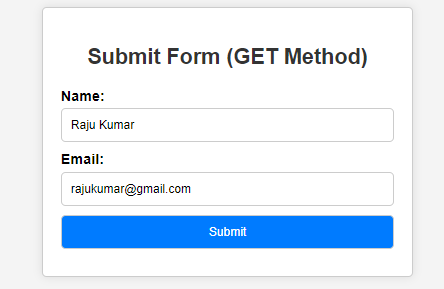
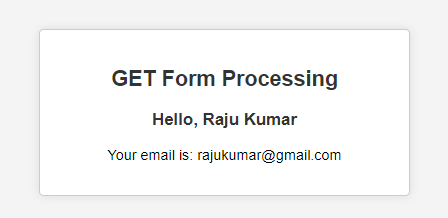
Step 4: Once we complete the project, it runs the tomcat server then output shows the form. Refer the below output image for better understanding.
1. Display the Form
2. Display the processed Data:
Below is the step-by-step implementation of POST method.
Step 1: Create the dynamic web project using eclipse and its project named as jsp-POST-demo.
Step 2: Create a JSP form named index.jsp and this form includes input fields to store user data and form attributes that can be stored on a JSP page to configure the form to be submitted and set the method attribute to "POST ".
Step 3: Create the new JSP page and it named as processPost.jsp to handles the form submission and in this page can retrieve the form data from the request object using getParameter() method. This method can take the name of the form field as its the parameter and returns the value entered by user.
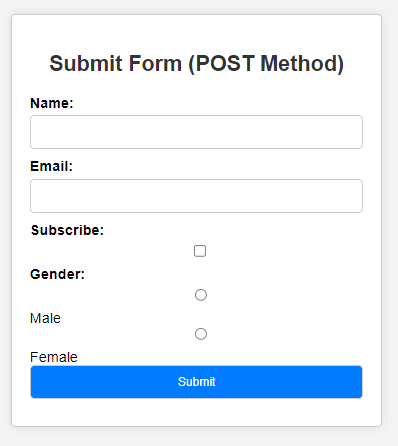
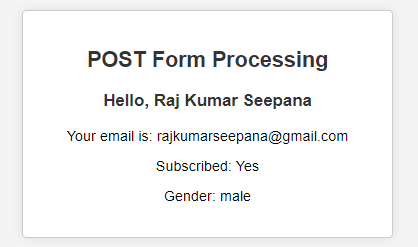
Step 4: Once we complete the project, it runs the tomcat server then output shows the form. Refer the below output image for better understanding.
1. Display the FORM:
👁 Submit Form2. Display Processed Data:
If we follow the above steps, then we can successfully build the JSP form processing demo project.