|
VOOZH | about |
|
VOOZH | about |
Welcome to our comprehensive CBSE Class 12th Computer Science Unit III Notes on Database Management. According to the latest CBSE guidelines, this unit contributes 30 marks to the CS board exam (2024-25). These third-unit CS notes are the best resource for a complete revision, simplifying complex concepts to make them easy to understand.
With these Computer Science notes you have all you need to secure good marks on your paper. Dive in and give yourself the best chance at excelling in your CBSE Class 12th exams.
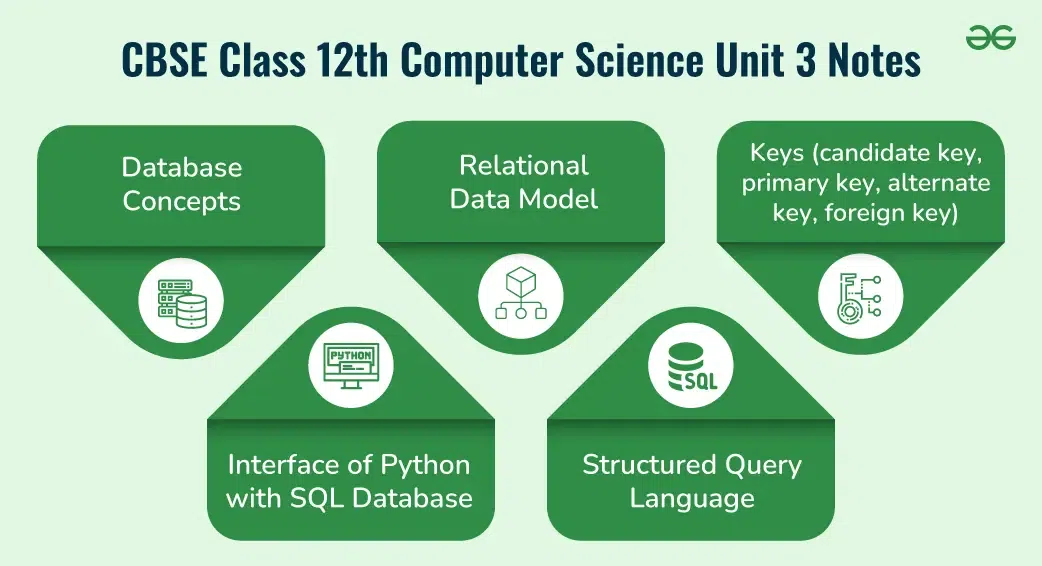
Here’s a comprehensive overview of the key concepts covered in the CBSE Class 12th CS Unit 3 notes:
- Database concepts: introduction to database concepts and its need
- Relational data model: relation, attribute, tuple, domain, degree, cardinality, keys (candidate key, primary key, alternate key, foreign key)
- Structured Query Language: introduction, Data Definition Language and Data Manipulation Language, data type (char(n), varchar(n), int, float, date), constraints (not null, unique, primary key), create database, use database, show databases, drop database, show tables, create table, describe table, alter table (add and remove an attribute, add and remove primary key), drop table, insert, delete, select, operators (mathematical, relational and logical), aliasing, distinct clause, where clause, in, between, order by, meaning of null, is null, is not null, like, update command, delete command, aggregate functions (max, min, avg, sum, count), group by, having clause, joins: cartesian product on two tables, equi-join and natural join
- Interface of python with an SQL database: connecting SQL with Python, performing insert, update, delete queries using cursor, display data by using connect(), cursor(), execute(), commit(), fetchone(), fetchall(), rowcount, creating database connectivity applications, use of %s format specifier or format() to perform queries.
Table of Content
Introduction to Database Concepts and Their Need
Databases are essential components of modern computing that store, manage, and retrieve data efficiently. Here’s an overview of what databases are, their key concepts, and why they are important.
Definition: A database is an organized collection of data stored electronically. It allows for easy access, management, and updating of data. Databases can range from simple lists to complex systems handling large volumes of information.
Components:
Query Language:
Efficient Data Management:
Data Integrity:
Data Security:
Concurrent Access:
Scalability:
The relational data model is a way of structuring data using relations (tables). It is fundamental to relational databases and organizes data into tables with rows and columns. Here’s a breakdown of key concepts in the relational data model:
4. Domain
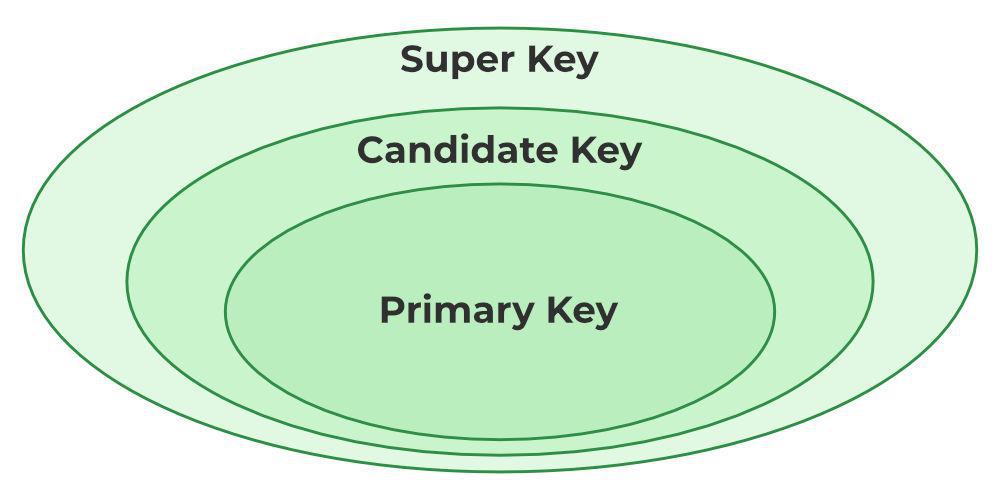
Keys are fundamental to relational databases as they uniquely identify rows within a table and establish relationships between tables. Here’s an overview of different types of keys:
Definition: A candidate key is an attribute or a set of attributes that can uniquely identify each tuple (row) in a table. A table can have multiple candidate keys, but each one is a potential primary key.
Characteristics:
Example: In a Student table, StudentID and Email might both be candidate keys if each is unique for every student.
Definition: The primary key is a specific candidate key chosen to uniquely identify each tuple in a table. It ensures that each row is unique and not null.
Characteristics:
Example: In the Students table, StudentID might be selected as the primary key.
3. Alternate Key
Definition: An alternate key is any candidate key that is not chosen as the primary key. It is still a unique identifier for tuples but is not used as the main key for the table.
Characteristics:
Example: If StudentID is chosen as the primary key, then Email (if unique) becomes an alternate key.
Definition: A foreign key is an attribute or a set of attributes in one table that refers to the primary key of another table. It establishes and enforces a link between the data in the two tables.
Characteristics:
Example: In an Enrollments table, StudentID might be a foreign key that refers to the StudentID primary key in the Students table.
Structured Query Language (SQL) is a standardized programming language used for managing and manipulating relational databases. SQL allows users to create, modify, and query databases effectively. It provides a way to interact with data stored in relational database management systems (RDBMS).
Data Definition Language (DDL) is a subset of SQL used for defining and managing database structures. It includes commands that define, alter, and drop database objects such as tables, indexes, and schemas.
Common DDL Commands:
Data Manipulation Language (DML) is a subset of SQL used for manipulating and querying the data stored in the database. It includes commands to insert, update, delete, and retrieve data.
Common DML Commands:
SQL data types define the kind of data that can be stored in a database column. Constraints are rules applied to columns to ensure data integrity and enforce specific data conditions.
CHAR(n)
VARCHAR(n)
INT
FLOAT
DATE
Constraints are the rules that we can apply on the type of data in a table. That is, we can specify the limit on the type of data that can be stored in a particular column in a table using constraints.
We can specify constraints at the time of creating the table using CREATE TABLE statement. We can also specify the constraints after creating a table using ALTER TABLE statement.
Syntax:
Below is the syntax to create constraints using CREATE TABLE statement at the time of creating the table.
CREATE TABLE sample_table
(
column1 data_type(size) constraint_name,
column2 data_type(size) constraint_name,
column3 data_type(size) constraint_name,
....
);

sample_table: Name of the table to be created.
data_type: Type of data that can be stored in the field.
constraint_name: Name of the constraint. for example- NOT NULL, UNIQUE, PRIMARY KEY etc.
NOT NULL
CREATE TABLE Student
(
ID int(6) NOT NULL,
NAME varchar(10) NOT NULL,
ADDRESS varchar(20)
);
UNIQUE
CREATE TABLE Student
(
ID int(6) NOT NULL UNIQUE,
NAME varchar(10),
ADDRESS varchar(20)
);
PRIMARY KEY
CREATE TABLE Student
(
ID int(6) NOT NULL UNIQUE,
NAME varchar(10),
ADDRESS varchar(20),
PRIMARY KEY(ID)
);
Data Types:
Constraints:
Managing databases involves creating, selecting, and deleting databases. Here are the essential SQL commands for these tasks:
Syntax:
sql
CREATE DATABASE database_name;
Example: To create a database named SchoolDB, you would use:
sql
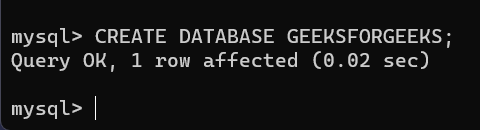
CREATE DATABASE GeeksForGeeks;
Output:
Syntax:
sql
USE database_name;
Example: To switch to the SchoolDB database, you would use:
sql
USE SchoolDB;
Syntax:
sql
SHOW DATABASES;
Example: Running this command will display a list of all databases, including SchoolDB, if it exists.4. DROP DATABASE
Syntax:
sql
DROP DATABASE database_name;
Example: To delete the SchoolDB database, you would use:
sql
DROP DATABASE SchoolDB;
Managing tables involves creating, modifying, and deleting tables, as well as inserting and deleting data. Here’s a guide to essential SQL commands for these tasks:
Syntax:
sql
SHOW TABLES;
Syntax:
sql
CREATE TABLE table_name (  column1 datatype constraints,  column2 datatype constraints,  ...);
Example: To create a table named Students with columns StudentID, Name, and DateOfBirth:
sql
CREATE TABLE Students (  StudentID INT PRIMARY KEY,  Name VARCHAR(50) NOT NULL,  DateOfBirth DATE);
Syntax:
sql
DESCRIBE table_name;
Example: To view the structure of the Students table:
sql
DESCRIBE Students;
Syntax:
sql
ALTER TABLE table_name
ADD column_name datatype constraints;
Example: To add an Email column to the Students table:
sq
ALTER TABLE Students
ADD Email VARCHAR(100);
Syntax:
sql
ALTER TABLE table_name
DROP COLUMN column_name;
Example: To remove the Email column from the Students table:
sql
ALTER TABLE Students
DROP COLUMN Email;
Syntax:
sql
ALTER TABLE table_name
ADD PRIMARY KEY (column_name);
Example: To add a primary key constraint to the StudentID column:
sql
ALTER TABLE Students
ADD PRIMARY KEY (StudentID);
Syntax:
sql
ALTER TABLE table_name
DROP PRIMARY KEY;
Example: To remove the primary key constraint:
sq
ALTER TABLE Students
DROP PRIMARY KEY;
Syntax:
sql
DROP TABLE table_name;
Example: To delete the Students table:
sql
DROP TABLE Students;
Syntax:
sql
INSERT INTO table_name (column1, column2, ...)VALUES (value1, value2, ...);
Example: To insert a new student into the Students table:
sql
INSERT INTO Students (StudentID, Name, DateOfBirth)VALUES (1, 'Alice Smith', '2005-05-15');
Syntax:
sql
DELETE FROM table_name
WHERE condition;Example: To delete a student with StudentID 1 from the Students table:
sql
DELETE FROM Students
WHERE StudentID = 1;
SQL SELECT and Operators
The SELECT statement is used to query and retrieve data from a database. It is one of the most commonly used SQL commands.
Basic Syntax:
sql
SELECT column1, column2, ...FROM table_name
WHERE condition;
Example: To retrieve the Name and DateOfBirth of students from the Students table:
sql
SELECT Name, DateOfBirth
FROM Students;
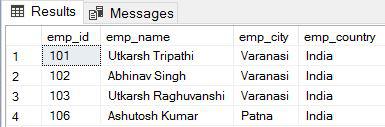
In this example, we will retrieve all records from the “employee” table where the “emp_city” column does not start with the letter ‘A’.
Query:
sql
SELECT * FROM employee WHERE emp_city NOT LIKE 'A%';
Output:
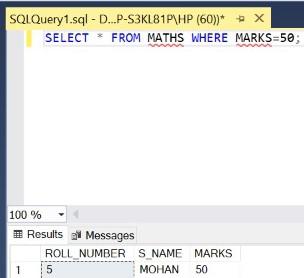
In this example, we will retrieve all records from the “MATHS” table where the value in the “MARKS” column is equal to 50.
Query:
sql
SELECT * FROM MATHS WHERE MARKS=50;
Output:
SQL operators are used to perform operations on data in queries. They can be categorized into mathematical, relational, and logical operators.
Definition: Used to perform arithmetic operations.
Common Operators:
Definition: Used to compare values and return a boolean result.
Common Operators:
Definition: Used to combine multiple conditions in queries.
Common Operators:
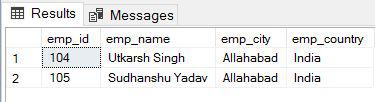
In this example, retrieve all records from the “employee” table where the “emp_city” column is equal to ‘Allahabad’ and the “emp_country” column is equal to ‘India’.
SELECT * FROM employee
WHERE emp_city = 'Allahabad'
AND emp_country = 'India';
Output:
SQL Query Enhancements
Syntax:
sql
SELECT column_name AS alias_nameFROM table_name AS alias_name;
Example: To create a shorter name for the Students table and a column alias for DateOfBirth:
sql
SELECT Name AS StudentName, DateOfBirth AS DOB
FROM Students AS S;
Definition: The DISTINCT clause removes duplicate rows from the result set, showing only unique values.
Syntax:
sql
SELECT DISTINCT column_nameFROM table_name;
Example: To find unique Grade values in the Students table:
sql
SELECT DISTINCT Grade
FROM Students;
Definition: The WHERE clause filters records to include only those that meet a specified condition.
Syntax:
sql
SELECT column1, column2, ...FROM table_name
WHERE condition;
Example: To select students older than 18:
sql
SELECT Name, Age
FROM Students
WHERE Age > 18;
Definition: The IN operator checks if a value matches any value in a specified list.
Syntax:
sql
SELECT column_nameFROM table_name
WHERE column_name IN (value1, value2, ...);
Example: To select students with grades 'A' or 'B':
sql
SELECT Name
FROM Students
WHERE Grade IN ('A', 'B');
Definition: The BETWEEN operator filters records within a specified range (inclusive).
Syntax:
sql
SELECT column_nameFROM table_name
WHERE column_name BETWEEN value1 AND value2;
Example: To find products with prices between 10 and 50:
sql
SELECT ProductName
FROM Products
WHERE Price BETWEEN 10 AND 50;
Definition: The ORDER BY clause sorts the result set by one or more columns. You can sort in ascending (default) or descending order.
Syntax:
sql
SELECT column1, column2, ...FROM table_name
ORDER BY column_name [ASC|DESC];
Example: To select students and sort them by age in ascending order:
sql
SELECT Name, Age
FROM Students
ORDER BY Age ASC;
Example: To sort products by price in descending order:
sql
SELECT ProductName, Price
FROM Products
ORDER BY Price DESC;
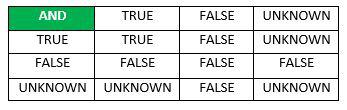
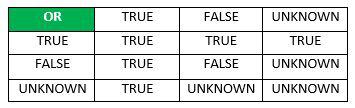
In general, each NULL value is considered to be different from every other NULL in the database. When a NULL is involved in a comparison operation, the result is considered to be UNKNOWN. Hence, SQL uses a three-valued logic with values True, False, and Unknown. It is, therefore, necessary to define the results of three-valued logical expressions when the logical connectives AND, OR, and NOT are used.
SQL Null Values and Common Commands
Syntax:
sql
SELECT column_nameFROM table_name
WHERE column_name IS NULL;
Example: To find students without a specified GraduationDate:
sql
SELECT NameFROM Students
WHERE GraduationDate IS NULL;
Definition: The IS NOT NULL condition is used to check if a column does not contain a NULL value.
Syntax:
sql
SELECT column_nameFROM table_name
WHERE column_name IS NOT NULL;
Example: To find students with a specified GraduationDate:
sql

SELECT NameFROM Students
WHERE GraduationDate IS NOT NULL;
Definition: The LIKE operator is used for pattern matching in a WHERE clause. It allows you to search for a specified pattern in a column.
Syntax:
sql
SELECT column_nameFROM table_name
WHERE column_name LIKE pattern;
Examples:
To find names starting with 'J':
sql
SELECT NameFROM Students
WHERE Name LIKE 'J%';
To find names with exactly 4 characters:
sql
SELECT NameFROM Students
WHERE Name LIKE '____';
Definition: The UPDATE command is used to modify existing records in a table.
Syntax:
sql
UPDATE table_nameSET column1 = value1, column2 = value2, ...
WHERE condition;
Example: To update the Grade of a student with StudentID 1:
sql
UPDATE StudentsSET Grade = 'A'
WHERE StudentID = 1;
Definition: The DELETE command removes existing records from a table based on a specified condition.
Syntax:
sql
DELETE FROM table_nameWHERE condition;
Example: To delete a student with StudentID 1:
sql
DELETE FROM Students
WHERE StudentID = 1;
SQL Aggregate Functions and Grouping
Aggregate functions perform calculations on a set of values and return a single result. They are often used with the GROUP BY clause to summarize data.
Syntax:
sql
SELECT MAX(column_name)FROM table_name;
Example: To find the highest price in the Products table:
sql
Copy code
SELECT MAX(Price) AS MaxPrice
FROM Products;
Syntax:
sql
SELECT MIN(column_name)FROM table_name;
Example: To find the lowest price in the Products table:
sql
SELECT MIN(Price) AS MinPrice
FROM Products;
Syntax:
sql
SELECT AVG(column_name)FROM table_name;
Example: To find the average price of products:
sql
SELECT AVG(Price) AS AveragePrice
FROM Products;
Syntax:
sql
SELECT SUM(column_name)FROM table_name;
Example: To calculate the total sales amount:
sql
SELECT SUM(SalesAmount) AS TotalSales
FROM Sales;
Syntax:
sql
SELECT COUNT(column_name)FROM table_name;
Example: To count the number of students:
sql
SELECT COUNT(StudentID) AS NumberOfStudents
FROM Students;
Syntax:
sql
SELECT column_name, aggregate_function(column_name)FROM table_name
GROUP BY column_name;
Example: To find the average price of products for each category:
sql
SELECT Category, AVG(Price) AS AveragePrice
FROM Products
GROUP BY Category;
Syntax:
sql
SELECT column_name, aggregate_function(column_name)FROM table_name
GROUP BY column_name
HAVING condition;
Example: To find categories where the average price is more than 50:
sql
SELECT Category, AVG(Price) AS AveragePrice
FROM Products
GROUP BY Category
HAVING AVG(Price) > 50;
Joins are used to combine rows from two or more tables based on a related column. SQL JOIN clause is used to query and access data from multiple tables by establishing logical relationships between them. It can access data from multiple tables simultaneously using common key values shared across different tables.
We can use SQL JOIN with multiple tables. It can also be paired with other clauses, the most popular use will be using JOIN with WHERE clause to filter data retrieval.
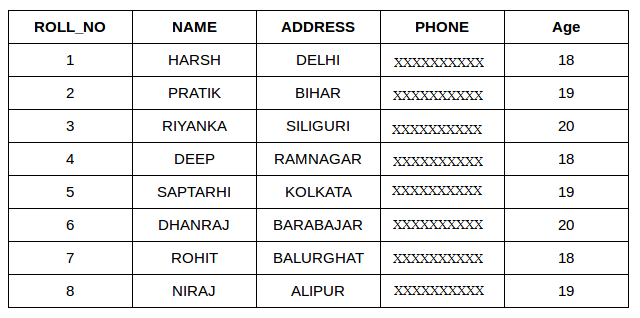
Consider the two tables below as follows:
Student:
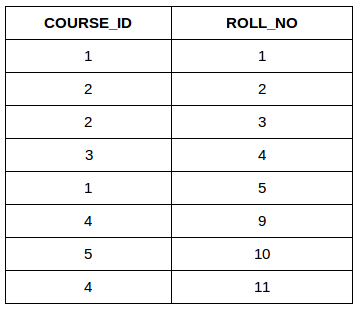
Student Course:
Both these tables are connected by one common key (column) i.e ROLL_NO.
We can perform a JOIN operation using the given SQL query:
SELECT s.roll_no, s.name, s.address, s.phone, s.age, sc.course_id
FROM Student s
JOIN StudentCourse sc ON s.roll_no = sc.roll_no;
Output:
| ROLL_NO | NAME | ADDRESS | PHONE | AGE | COURSE_ID |
| 1 | HARSH | DELHI | XXXXXXXXXX | 18 | 1 |
| 2 | PRATIK | BIHAR | XXXXXXXXXX | 19 | 2 |
| 3 | RIYANKA | SILGURI | XXXXXXXXXX | 20 | 2 |
| 4 | DEEP | RAMNAGAR | XXXXXXXXXX | 18 | 3 |
| 5 | SAPTARHI | KOLKATA | XXXXXXXXXX | 19 | 1 |
Here's a breakdown of different types of joins:
Syntax:
sql
SELECT *FROM table1, table2;
Example: If Students has 3 rows and Courses has 4 rows, the Cartesian product will produce 12 rows.
sql
SELECT *FROM Students, Courses;
Syntax:
sql
SELECT table1.column1, table2.column2, ...FROM table1
INNER JOIN table2
ON table1.common_column = table2.common_column;
Example: To find students and their enrolled courses:
sql
SELECT Students.Name, Courses.CourseNameFROM Students
INNER JOIN Enrollments
ON Students.StudentID = Enrollments.StudentID
INNER JOIN Courses
ON Enrollments.CourseID = Courses.CourseID;
Syntax:
sql
SELECT *FROM table1
NATURAL JOIN table2;
Example: To automatically join Students and Enrollments on the common column StudentID:
sql
SELECT *FROM Students
NATURAL JOIN Enrollments;
Connecting Python with an SQL Database
To interact with an SQL database from Python, you typically use libraries that provide database connectivity and operations. Here’s a guide on how to connect Python with an SQL database, specifically focusing on popular libraries like sqlite3, mysql-connector-python, and psycopg2.
1. Using sqlite3 for SQLite
SQLite is a lightweight, disk-based database that's built into Python's standard library. It's great for small to medium-sized applications.
Steps:
Example:
python
import sqlite3# Connect to the database (or create it if it doesn't exist)
conn = sqlite3.connect('example.db')
# Create a cursor object
cursor = conn.cursor()
# Create a table
cursor.execute('''CREATE TABLE IF NOT EXISTS students
(id INTEGER PRIMARY KEY, name TEXT, age INTEGER)''')
# Insert a record
cursor.execute("INSERT INTO students (name, age) VALUES ('Alice', 21)")
# Commit the changes
conn.commit()
# Query the database
cursor.execute("SELECT * FROM students")
rows = cursor.fetchall()
for row in rows:
print(row)
# Close the connection
conn.close()
To connect to a MySQL database, you can use the mysql-connector-python library. You need to install it via pip if you haven't already.
Installation:
bash
pip install mysql-connector-python
Example:
python
import mysql.connector# Connect to the MySQL database
conn = mysql.connector.connect(
host="localhost",
user="yourusername",
password="yourpassword",
database="yourdatabase"
)
# Create a cursor object
cursor = conn.cursor()
# Create a table
cursor.execute('''CREATE TABLE IF NOT EXISTS students
(id INT AUTO_INCREMENT PRIMARY KEY, name VARCHAR(255), age INT)''')
# Insert a record
cursor.execute("INSERT INTO students (name, age) VALUES (%s, %s)", ('Bob', 22))
# Commit the changes
conn.commit()
# Query the database
cursor.execute("SELECT * FROM students")
rows = cursor.fetchall()
for row in rows:
print(row)
# Close the connection
conn.close()
To connect to a PostgreSQL database, you can use the psycopg2 library. Install it via pip if needed.
Installation:
bash
pip install psycopg2
Example:
python
import psycopg2# Connect to the PostgreSQL database
conn = psycopg2.connect(
dbname="yourdatabase",
user="yourusername",
password="yourpassword",
host="localhost"
)
# Create a cursor object
cursor = conn.cursor()
# Create a table
cursor.execute('''CREATE TABLE IF NOT EXISTS students
(id SERIAL PRIMARY KEY, name VARCHAR(100), age INTEGER)''')
# Insert a record
cursor.execute("INSERT INTO students (name, age) VALUES (%s, %s)", ('Charlie', 23))
# Commit the changes
conn.commit()
# Query the database
cursor.execute("SELECT * FROM students")
rows = cursor.fetchall()
for row in rows:
print(row)
# Close the connection
conn.close()
Performing SQL Operations with Python's Cursor
Using a cursor object, you can execute SQL queries to perform operations like inserting, updating, and deleting data in a database. Here's how to use the cursor for these operations in Python, with examples for SQLite, MySQL, and PostgreSQL.
Example:
python
import sqlite3#Connect to the database
conn = sqlite3.connect('example.db')
cursor = conn.cursor()
# Insert a record
cursor.execute("INSERT INTO students (name, age) VALUES (?, ?)", ('John Doe', 25))
# Commit the changes
conn.commit()
# Close the connection
conn.close()
Example:
python
import mysql.connector# Connect to the database
conn = mysql.connector.connect(
host="localhost",
user="yourusername",
password="yourpassword",
database="yourdatabase"
)
cursor = conn.cursor()
# Update a record
cursor.execute("UPDATE students SET age = %s WHERE name = %s", (26, 'John Doe'))
# Commit the changes
conn.commit()
# Close the connection
conn.close()
Example:
python
import psycopg2# Connect to the database
conn = psycopg2.connect(
dbname="yourdatabase",
user="yourusername",
password="yourpassword",
host="localhost"
)
cursor = conn.cursor()
# Delete a record
cursor.execute("DELETE FROM students WHERE name = %s", ('John Doe',))
# Commit the changes
conn.commit()
# Close the connection
conn.close()
When working with SQL databases in Python, you typically use methods like connect(), cursor(), execute(), commit(), fetchone(), fetchall(), and rowcount to interact with and display data. Here’s how you can use these methods effectively with examples.
Definition: Establish a connection to the SQL database using connect().
Example:
import sqlite3# Connect to the SQLite database
conn = sqlite3.connect('example.db')
Definition: Create a cursor object using cursor(). The cursor allows you to execute SQL commands.
Example:
cursor = conn.cursor()
Definition: Use execute() to run SQL commands.
Example:
cursor.execute("SELECT * FROM students")
Definition: Retrieve data from the executed query.
Methods:
Example:
row = cursor.fetchone()
print(row)
Example:
rows = cursor.fetchall()for row in rows:
print(row)
Example:
Python
cursor.execute("DELETE FROM students WHERE age < 20")
print(f"Number of rows deleted: {cursor.rowcount}")
Example:
python
conn.commit()
Example:
python
cursor.close()
conn.close()
Here’s a complete example that demonstrates connecting to a SQLite database, executing a query, fetching data, and displaying it:
python
import sqlite3
# Connect to the SQLite database
conn = sqlite3.connect('example.db')
# Create a cursor object
cursor = conn.cursor()
# Execute a query
cursor.execute("SELECT * FROM students")
# Fetch all rows from the result of the query
rows = cursor.fetchall()
# Display each row
for row in rows:
print(row)
# Fetch the number of rows returned
print(f"Number of rows fetched: {len(rows)}")
# Close the cursor and connection
cursor.close()
conn.close()
Creating database connectivity applications
Creating database connectivity applications in Python involves several key steps. Here’s a comprehensive guide to help you build applications that connect to, query, and manipulate databases using popular SQL libraries.
MySQL:
bash
pip install mysql-connector-python
PostgreSQL:
bash
pip install psycopg2
Establishing a connection is the first step in database connectivity. Below are examples for SQLite, MySQL, and PostgreSQL.
SQLite
import sqlite3
# Connect to an SQLite database (or create it if it doesn't exist)
conn = sqlite3.connect('mydatabase.db')
MySQL
import mysql.connector
# Connect to a MySQL database
conn = mysql.connector.connect(
host="localhost",
user="yourusername",
password="yourpassword",
database="yourdatabase"
)
PostgreSQL
import psycopg2
# Connect to a PostgreSQL database
conn = psycopg2.connect(
dbname="yourdatabase",
user="yourusername",
password="yourpassword",
host="localhost"
)
The cursor object allows you to execute SQL queries and fetch results.
python
cursor = conn.cursor()
You can execute various SQL queries such as creating tables, inserting data, updating records, and more.
python
cursor.execute('''CREATE TABLE IF NOT EXISTS students
(id INTEGER PRIMARY KEY, name TEXT, age INTEGER)''')
python
cursor.execute("INSERT INTO students (name, age) VALUES (?, ?)", ('Alice', 22))
python
cursor.execute("UPDATE students SET age = ? WHERE name = ?", (23, 'Alice'))
python
cursor.execute("DELETE FROM students WHERE name = ?", ('Alice',))
Retrieve data from the database using methods like fetchone(), fetchall(), or fetchmany(size).
Fetch All Data
cursor.execute("SELECT * FROM students")
rows = cursor.fetchall()
for row in rows:
print(row)
Fetch One Row
cursor.execute("SELECT * FROM students LIMIT 1")
row = cursor.fetchone()
print(row)
For operations that modify the database, use commit() to save changes.
python
conn.commit()
Always close the cursor and connection to free up resources.
python
cursor.close()
conn.close()
Here’s a complete example that demonstrates a simple Python application with database connectivity. This example uses SQLite for simplicity, but the approach is similar for MySQL and PostgreSQL.
python
import sqlite3
def create_table(conn):
cursor = conn.cursor()
cursor.execute('''CREATE TABLE IF NOT EXISTS students
(id INTEGER PRIMARY KEY, name TEXT, age INTEGER)''')
conn.commit()
def insert_student(conn, name, age):
cursor = conn.cursor()
cursor.execute("INSERT INTO students (name, age) VALUES (?, ?)", (name, age))
conn.commit()
def fetch_students(conn):
cursor = conn.cursor()
cursor.execute("SELECT * FROM students")
rows = cursor.fetchall()
for row in rows:
print(row)
def main():
# Connect to the SQLite database
conn = sqlite3.connect('mydatabase.db')
# Create table
create_table(conn)
# Insert a new student
insert_student(conn, 'John Doe', 21)
# Fetch and display all students
fetch_students(conn)
# Close the connection
conn.close()
if __name__ == "__main__":
main()
When executing SQL queries in Python, you often need to pass parameters to queries. There are different ways to do this, such as using the %s format specifier or the format() method. It's important to use the correct approach to ensure that your queries are both functional and secure.
The %s format specifier is commonly used with libraries like sqlite3, mysql-connector-python, and psycopg2. This method is generally preferred because it helps prevent SQL injection attacks by automatically escaping special characters.
python
import sqlite3
# Connect to the database
conn = sqlite3.connect('example.db')
cursor = conn.cursor()
# Use %s format specifier for parameterized queries
cursor.execute("INSERT INTO students (name, age) VALUES (?, ?)", ('John Doe', 25))
conn.commit()
# Fetch and display data
cursor.execute("SELECT * FROM students WHERE name = ?", ('John Doe',))
print(cursor.fetchone())
# Close the connection
cursor.close()
conn.close()
python
import mysql.connector
# Connect to the database
conn = mysql.connector.connect(
host="localhost",
user="yourusername",
password="yourpassword",
database="yourdatabase"
)
cursor = conn.cursor()
# Use %s format specifier for parameterized queries
cursor.execute("INSERT INTO students (name, age) VALUES (%s, %s)", ('Jane Smith', 30))
conn.commit()
# Fetch and display data
cursor.execute("SELECT * FROM students WHERE name = %s", ('Jane Smith',))
print(cursor.fetchone())
# Close the connection
cursor.close()
conn.close()
python
import psycopg2
# Connect to the database
conn = psycopg2.connect(
dbname="yourdatabase",
user="yourusername",
password="yourpassword",
host="localhost"
)
cursor = conn.cursor()
# Use %s format specifier for parameterized queries
cursor.execute("INSERT INTO students (name, age) VALUES (%s, %s)", ('Alice Johnson', 28))
conn.commit()
# Fetch and display data
cursor.execute("SELECT * FROM students WHERE name = %s", ('Alice Johnson',))
print(cursor.fetchone())
# Close the connection
cursor.close()
conn.close()
While you can use the format() method to construct queries, it is generally not recommended due to security concerns like SQL injection. Direct string interpolation should be avoided in favor of parameterized queries.
python
import sqlite3
# Connect to the database
conn = sqlite3.connect('example.db')
cursor = conn.cursor()
# Unsafe way: using format() for query construction
name = 'John Doe'
age = 25
cursor.execute("INSERT INTO students (name, age) VALUES ('{}', {})".format(name, age))
conn.commit()
# Fetch and display data
cursor.execute("SELECT * FROM students WHERE name = '{}'".format(name))
print(cursor.fetchone())
# Close the connection
cursor.close()
conn.close()
Here is the complete marks distribution of computer science class 12th with marks distribution are as follow:
| Topic | Marks |
|---|---|
| Database concepts | 3-5 marks |
| Relational data model | 5-7 marks |
| Structured Query Language | 8-12 marks |
| Interface of Python with an SQL databass | 8-12 marks |
Note: This marks distribution is based on previous syllabi, helping you focus on the key areas to maximize your score in the board exams.
In conclusion, mastering the concepts of Database Management in Unit III is crucial for excelling in the CBSE Class 12th Computer Science exam. By following these notes, which are crafted according to the latest CBSE guidelines, you can ensure a thorough understanding of key topics such as database concepts, the relational data model, SQL, and the interface of Python with an SQL database.
This comprehensive revision tool, covering the essential aspects and their respective marks distribution, equips you with the knowledge and confidence needed to perform well in your exams. Focus on these areas, practice diligently, and you will be well-prepared to achieve excellent marks in your Computer Science paper.