|
VOOZH | about |
|
VOOZH | about |
In SQL, aliases provide temporary names for columns or tables to make queries cleaner and easier to understand. They are especially helpful in complex queries or when dealing with lengthy names.
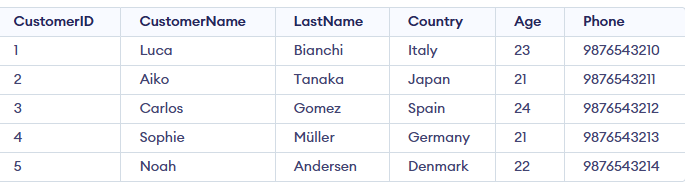
Example: First, we create a demo SQL database and table, on which we will use the Aliases command.
Query:
SELECT EmpID AS id
FROM Employees;
Output:
There are two types of aliases:
A column alias is used to rename a column just for the output of a query. They are useful when:
Syntax:
SELECT column_name AS alias_name
FROM table_name;
Let's understand Aliases in SQL with the help of example. First, we will create a demo SQL database and table, on which we will use the Aliases command.
Query:
SELECT CustomerID AS id
FROM Customer;
Output:
A table alias is used when you want to give a table a temporary name for the duration of a query. Table aliases are especially helpful in JOIN operations to simplify queries, particularly when the same table is referenced multiple times (like in self-joins).
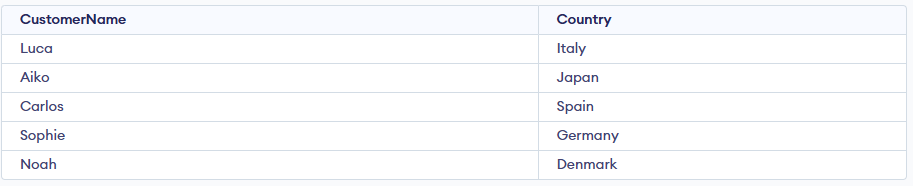
Query:
SELECT c1.CustomerName, c1.Country
FROM Customer AS c1, Customer AS c2
WHERE c1.Age = c2.Age AND c1.Country = c2.Country;
Output:
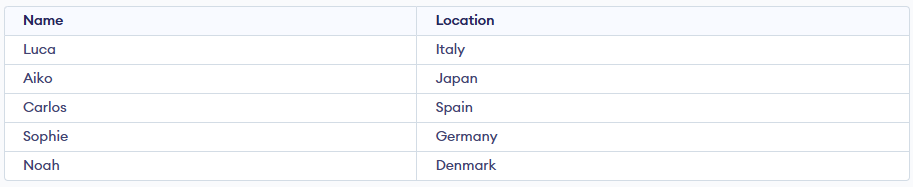
We want to fetch customers who are aged 21 or older and rename the columns for better clarity. We will use both table and column aliases.
Query:
SELECT c.CustomerName AS Name, c.Country AS Location
FROM Customer AS c
WHERE c.Age >= 21;
Output: