|
VOOZH | about |
|
VOOZH | about |
The AVG() function in SQL calculates the average of a numeric column. It helps identify the central value of data by ignoring NULL entries. Overall, it is a quick way to summarize large datasets.
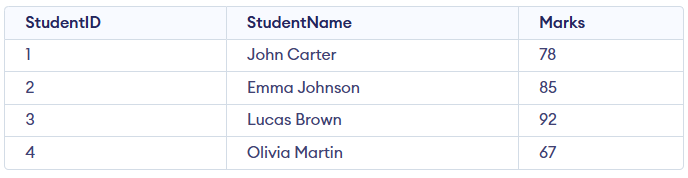
Example: First, we create a demo SQL database and table, on which we use the AVG() functions.
Query:
SELECT AVG(Marks) AS AverageMarks
FROM Student;
Output:
Syntax:
SELECT AVG(column_name)
FROM table_name;
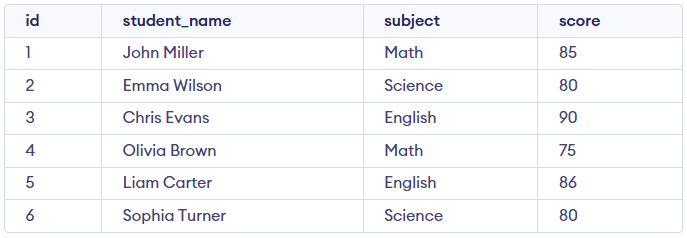
Here, we demonstrate the usage of the AVG() function using a sample table named student_scores. Consider this student_scores table for all the examples below:
In this example, we use AVG() to get the complete overall average of all scores.
Query:
SELECT AVG(score) AS overall_average_score
FROM student_scores;
Output:
In this example, we use AVG() with the GROUP BY clause to find the average score for each subject.
Query:
SELECT subject, AVG(score) AS average_score
FROM student_scores
GROUP BY subject;
Output:
In this example, AVG() is used with a WHERE clause to find the average score only for Science.
Query:
SELECT AVG(score) AS average_science_score
FROM student_scores
WHERE subject = 'Science';
Output:
In this example, we use AVG() with HAVING to display only those subjects whose average score exceeds 85.
Query:
SELECT subject, AVG(score) AS average_score
FROM student_scores
GROUP BY subject
HAVING AVG(score) > 85;
Output:
While the AVG() function is a powerful tool for data analysis, there are some considerations to keep in mind: