|
VOOZH | about |
|
VOOZH | about |
In SQL, NOT NULL constraint in SQL ensures a column must always contain a value and cannot be left empty. Unlike a PRIMARY KEY, which uniquely identifies each record and also disallows NULLs, NOT NULL only enforces the presence of data without requiring uniqueness.
Query:
CREATE TABLE Student (
 StuID INT NOT NULL,
 FullName VARCHAR(50),
 City VARCHAR(50)
);

--Insert data into Student table

INSERT INTO Student (StuID, FullName, City) VALUES
(101, 'Bob', 'London'),
(102, 'Lucas', 'London');
Output:
Query:
INSERT INTO Student (StuID, FullName, City) VALUES
(NULL, 'John', 'London');
Error:
Syntax:
CREATE TABLE table_Name
(
column1 data_type(size) NOT NULL,
column2 data_type(size) NOT NULL,
....
);
The syntax for applying the NOT NULL constraint can be as follows:
CREATE TABLE table_Name (
 column1 data_type(size) NOT NULL,
 column2 data_type(size) NOT NULL,
 ...
);
You can also add a NOT NULL constraint to an existing column in a table using the ALTER TABLE statement:
ALTER TABLE table_name
MODIFY column_name data_type(size) NOT NULL;
Let's understand NOT NULL in SQL with examples. Here we will look at different examples of the SQL NOT NULL Constraint command. First, we create a demo SQL database and table, on which we use the NOT NULL Constraint command.
Let’s look at an example where we create an EMPLOYEES table with a NOT NULL constraint applied to the EmpID column to ensure that each employee has a unique, non-null ID.
Query:
CREATE TABLE Emp (
 EmpID INT NOT NULL PRIMARY KEY,
 Name VARCHAR(50),
 Country VARCHAR(50),
 Age INT(2),
 Salary INT(10)
);

-- Insert valid rows (EmpID has values, so inserts succeed)

INSERT INTO Emp (EmpID, Name, Country, Age, Salary) VALUES
(1, 'John', 'USA', 28, 35000),
(2, 'Emma', 'Canada', 32, 55000),
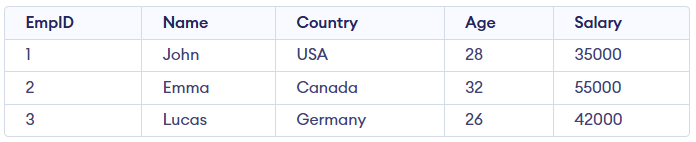
(3, 'Lucas', 'Germany', 26, 42000);
Output:
Query:
-- Attempt to insert a row with NULL in NOT NULL column (this will throw an error)
-- ERROR: Column 'EmpID' cannot be NULL

INSERT INTO Emp (EmpID, Name, Country, Age, Salary) VALUES
(NULL, 'Oliver', 'France', 30, 50000);
Error:
You can add a NOT NULL constraint to an existing table using ALTER TABLE. Suppose the Student table already exists which allows NULL values, and we now want to make the StuID column non-nullable.
ALTER TABLE Student
MODIFY COLUMN StuID SET NOT NULL;
Query:
INSERT INTO Student (StuID, FullName, City) VALUES
(NULL, 'Mark', 'London');
Error: