|
VOOZH | about |
|
VOOZH | about |
SQL window functions allow performing calculations across a set of rows that are related to the current row, without collapsing the result into a single value. They are commonly used for tasks like aggregates, rankings and running totals. The OVER clause defines the “window” of rows for the calculation. It can:
With this, functions such as SUM(), AVG(), ROW_NUMBER(), RANK() and DENSE_RANK() can be applied in a controlled way.
Syntax:
SELECT column_name1,
 window_function(column_name2)
 OVER ([PARTITION BY column_name3] [ORDER BY column_name4]) AS new_column
FROM table_name;
SUM(), AVG(), ROW_NUMBER(), etc.)PARTITION BY)ORDER BY)SQL window functions are mainly of two types: aggregate window functions and ranking window functions.
Example: First, we create a demo table Employee, and now we will apply window functions on it.
Aggregate window functions calculate aggregates over a window of rows while retaining individual rows. Common aggregate functions include:
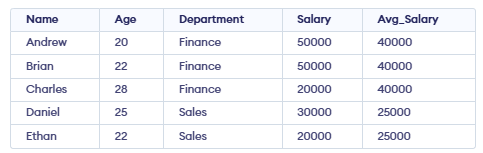
Example: Using AVG(), we will calculate the average salary within each department.
SELECT Name, Age, Department, Salary,
 AVG(Salary) OVER( PARTITION BY Department) AS Avg_Salary
 FROM Employee
Output:
👁 Screenshot-2026-01-16-130139These functions provide rankings of rows within a partition based on specific criteria. Common ranking functions include:
RANK() functions are used to assign ranks to rows within a group based on a specific order. Ranking functions are commonly used to organize and analyze data. Some common ranking functions include:
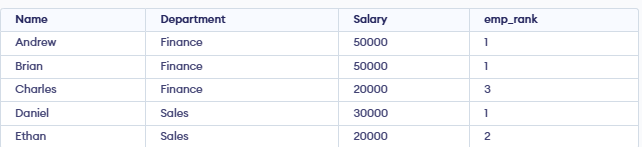
Example: Using RANK(), we will rank employees by salary, allowing gaps in ranks when salaries are equal.
SELECT Name, Department, Salary,
 RANK() OVER(PARTITION BY Department ORDER BY Salary DESC) AS emp_rank
FROM employee;
Output:
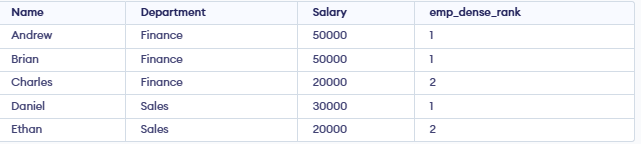
👁 Screenshot-2026-01-16-143023DENSE_RANK() gives the same rank to rows with equal values. It then continues with the next number without skipping, keeping the ranking sequence continuous.
Example: Using DENSE_RANK(), we will rank employees by salary without skipping ranks.
SELECT Name, Department, Salary,
 DENSE_RANK() OVER(PARTITION BY Department ORDER BY Salary DESC) AS emp_dense_rank
FROM employee;
Output:
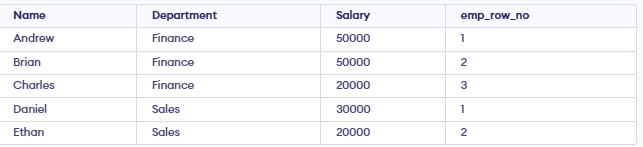
👁 Screenshot-2026-01-16-143244ROW_NUMBER() gives a unique number to each row in the result set. It increments by 1 for every row, even if values are the same, so no two rows have the same number.
Example: Using ROW_NUMBER(), we will assign a unique number to each row based on salary order.
SELECT Name, Department, Salary,
 ROW_NUMBER() OVER(PARTITION BY Department ORDER BY Salary DESC) AS emp_row_no
FROM employee;
Output:
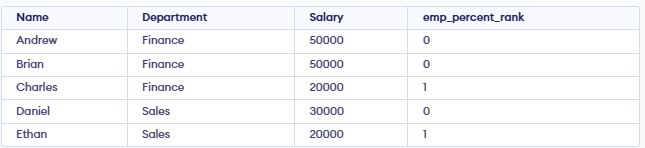
👁 Screenshot-2026-01-16-143426PERCENT_RANK() shows where a row stands compared to others in the same group. The formula is:
PERCENT_RANK() = (RANK - 1)/(Total Rows in Partition - 1)Example: Using PERCENT_RANK(), we will find the relative salary position of each employee within a department.
SELECT Name, Department, Salary,
 PERCENT_RANK() OVER(PARTITION BY Department ORDER BY Salary DESC) AS emp_percent_rank
FROM employee;
Output:
👁 Screenshot-2026-01-16-143519This helps to identify and fix problems like incorrect partitioning, wrong order or slow performance when using window functions.