|
VOOZH | about |
|
VOOZH | about |
The SQL SUM() function is an aggregate function used to calculate the total value of a numeric column. It is widely used in reporting, financial calculations, and data analysis to quickly get overall totals.
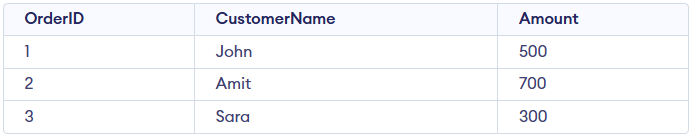
Example: First, we create a demo SQL database and table, on which we use the SUM() functions.
Query:
SELECT SUM(Amount) AS TotalAmount
FROM Orders;
Output:
Syntax:
SELECT SUM(column_name)
FROM table_name;
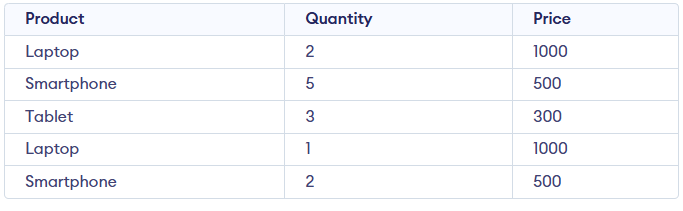
In this section, we demonstrate the SUM() function using a Sales table (Product, Quantity, Price) to understand how it calculates totals and distinct sums; consider this Sales table for the below examples:
In this example, SUM() calculates the total of a single numeric column.
Query:
SELECT SUM(Price) AS TotalPrice
FROM Sales;
In this example, calculates total revenue by multiplying quantity and price.
Query:
SELECT SUM(Quantity * Price) AS TotalRevenue
FROM Sales;
In this example, SUM() is used along with GROUP BY clause. It calculates revenue separately for each product.
SELECT Product, SUM(Quantity * Price) AS TotalRevenue
FROM Sales
GROUP BY Product;
In this example, SUM() is used with the DISTINCT keyword to sum only unique price values.
SELECT SUM(DISTINCT Price) AS SumDistinctPrice
FROM Sales;
The HAVING clause can be used with GROUP BY to filter groups based on the result of the SUM() function, allowing conditions on aggregated data.
SELECT Product, SUM(Quantity * Price) AS TotalRevenue
FROM Sales
GROUP BY Product
HAVING SUM(Quantity * Price) > 2000;