|
VOOZH | about |
|
VOOZH | about |
SQL provides the WHERE clause to filter rows based on one or more conditions. It ensures that queries return or modify only the required records.
Example: First, we will create a demo SQL database and Employees table, on which we will use the WHERE Clause command.
Query:
SELECT Name, Department, Salary
FROM Employees
WHERE Salary > 50000;
Output:
Syntax:
SELECT column1, column2
FROM table_name
WHERE column_name operator value;
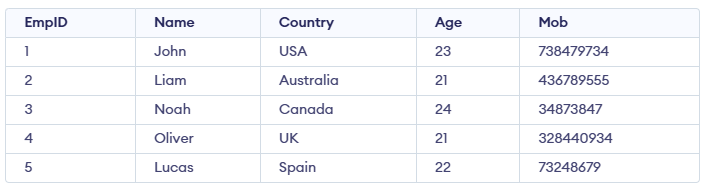
We will create a basic employee table structure in SQL for performing all the where clause operation.
To fetch records of Employee with age equal to 24.
Query:
SELECT * FROM Employees WHERE Age=24;Output:
To fetch the EmpID, Name and Country of Employees with Age greater than 21.
Query:
SELECT EmpID, Name, Country FROM Employees WHERE Age > 21;Output:
The BETWEEN operator is used to filter records within a specified range, and it includes both the start and end values. In this example, we want to find employees whose age is between 22 and 24, including both 22 and 24.
Query:
SELECT * FROM Employees
WHERE Age BETWEEN 22 AND 24;
Output:
The LIKE operator is used to filter data by matching a specific pattern in the WHERE clause. In this example, we retrieve records of employees whose names start with the letter 'L'.
Query:
SELECT * FROM Employees
WHERE Name LIKE 'L%';
Output:
It is used to fetch the filtered data same as fetched by '=' operator just the difference is that here we can specify multiple values for which we can get the result set. Here we want to find the Names of Employees where Age is 21 or 23.
Query:
SELECT Name FROM Employees
WHERE Age IN (21,23);
Output:
| Operator | Description |
|---|---|
| > | Greater Than |
| >= | Greater than or Equal to |
| < | Less Than |
| <= | Less than or Equal to |
| = | Equal to |
| <> | Not Equal to |
| BETWEEN | In an inclusive Range |
| LIKE | Search for a pattern |
| IN | To specify multiple possible values for a column |