|
VOOZH | about |
|
VOOZH | about |
The SQL COUNT() function is used to return the number of rows or non-null values in a column. It helps summarize data in reports and analytics.
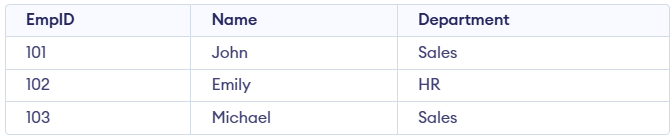
Example: First, we create a demo SQL database and table, on which we will use the COUNT() functions.
Query:
SELECT COUNT(*) AS TotalEmployees FROM Employee;
SELECT COUNT(DISTINCT Department) AS UniqueDepartments
FROM Employee;
Output:
Syntax:
COUNT(expression)1. Count all rows:
SELECT COUNT(*) FROM table_name;2. Count distinct values in a column:
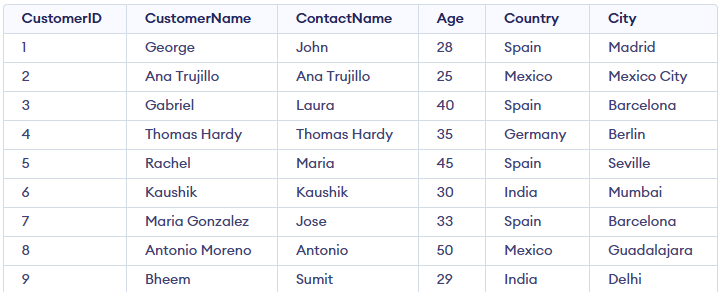
SELECT COUNT(DISTINCT column_name) FROM table_name;Let’s explore practical examples of the COUNT() function using a sample Customers table; consider the table below for all examples.
When we want to count all the rows in a table, regardless of the column values, we can use COUNT(*). It counts every row, including rows with NULL values.
Query:
SELECT COUNT(*) AS TotalCustomers
FROM Customers;
Output:
Sometimes, we may need to count only the distinct values in a column. The COUNT(DISTINCT column_name) function allows us to count only unique entries in a column, ignoring duplicates.
SELECT COUNT(DISTINCT Country) FROM Customers;Output:
Customers table.4 indicates that there are four distinct countries listed in the table (Spain, Mexico, India, and Germany).We can use the COUNT() function along with CASE WHEN to count rows that match a specific condition. This is helpful when we want to count rows based on certain criteria without filtering the rows out of the result set.
Query:
SELECT COUNT(CASE WHEN Age > 30 THEN 1 ELSE NULL END) AS Adults
FROM Customers;
Output:
We can use the COUNT() function with GROUP BY to count rows within groups based on a column. This is useful when we want to categorize data and then count how many records exist in each category.
Query:
SELECT Country, COUNT(*) AS CustomerCount
FROM Customers
GROUP BY Country;
Output:
Customers table by the Country column and then counts how many customers belong to each country.We can combine the COUNT() function with HAVING to filter the results after grouping. The HAVING clause is used to specify conditions on groups, similar to the WHERE clause, but for groups.
SELECT Country, COUNT(*) AS CustomerCount
FROM Customers
GROUP BY Country
HAVING COUNT(*) > 2;
Output:
The COUNT() function is powerful and widely used, but to keep queries efficient and easy to maintain, it's important to follow a few best practices.
On large tables, COUNT() can be slow if the database must scan the entire dataset. Adding indexes to frequently counted columns improves performance.
Query:
-- Create index on Country column
CREATE INDEX idx_country
ON Customers(Country);

-- Faster COUNT query using the index
SELECT COUNT(*)
FROM Customers
WHERE Country = 'Spain';
Output:
Queries with many conditions or subqueries can be slow on very large tables. Simplify or break them into smaller parts to improve performance.
Query:
SELECT COUNT(*)
FROM Customers
WHERE (Country = 'Spain' OR Country = 'France')
AND Age > 30
AND City = 'Barcelona';
Output: