|
VOOZH | about |
|
VOOZH | about |
The SQL UPDATE statement is used to modify existing data in a table by changing the values of one or more columns.
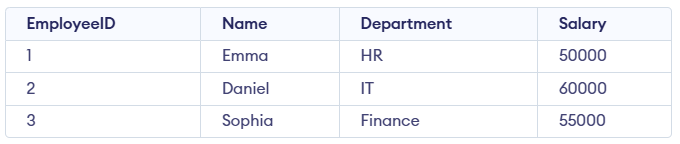
Example: First, we will create a demo SQL database and table, on which we will use the UPDATE Statement command.
Query:
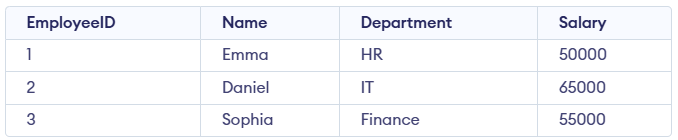
UPDATE Employees
SET Salary = 65000
WHERE Name = 'Daniel'; Syntax:
UPDATE table_name
SET column1 = value1, column2 = value2,...
WHERE condition;Note: The SET keyword assigns new values to columns, while the WHERE clause selects which rows to update. Without WHERE, all rows will be updated.
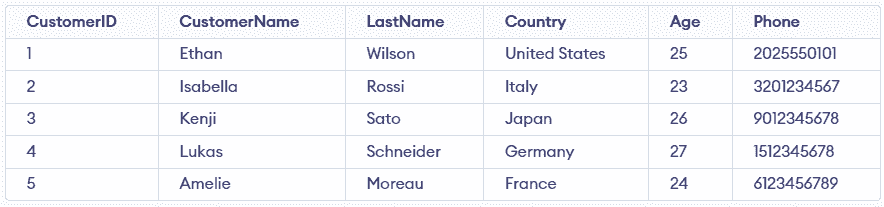
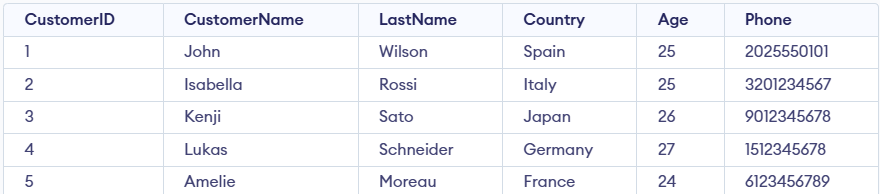
Consider the Customer table shown below, which contains each customer’s unique ID, name, last name, phone number, and country. This table will be used to demonstrate how the SQL UPDATE statement works.
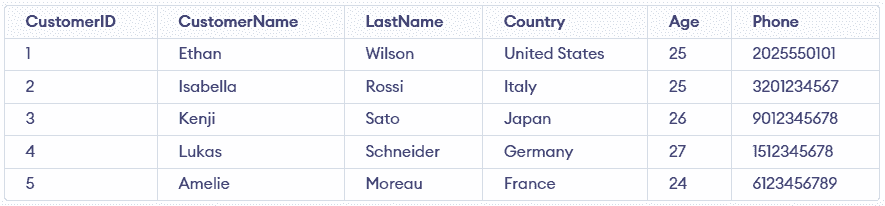
We have a Customer table and we want to update the Age to 25 for the customer whose CustomerName is 'Isabella'.
Query:
UPDATE Customer
SET Age = 25
WHERE CustomerName = 'Isabella';
SELECT * FROM customer;Output:
We need to update both the CustomerName and Country for a specific CustomerID.
UPDATE Customer
SET CustomerName = 'John',
Country = 'Spain'
WHERE CustomerID = 1;Output:
Note: For updating multiple columns we have used comma(,) to separate the names and values of two columns.
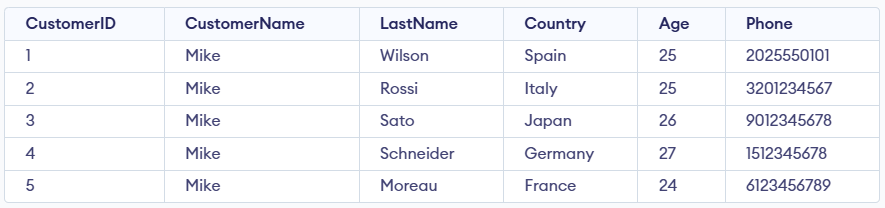
If we accidentally omit the WHERE clause, all the rows in the table will be updated, which is a common mistake. Let’s update the CustomerName for every record in the table:
Query:
UPDATE Customer
SET CustomerName = 'Mike';
SELECT * FROM customer;Output: