|
VOOZH | about |
|
VOOZH | about |
The SQL MAX() function helps quickly identify the highest value within any column, making it useful for summarizing and analyzing data trends. It is widely used in reports to find top values like peak sales, latest dates, or highest scores.
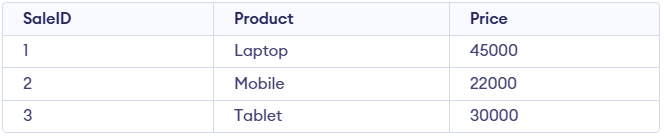
Example: First, we create a demo SQL database and table, on which we use the MAX() functions.
Query:
SELECT MAX(Price) AS HighestPrice
FROM SalesData;
Output:
Syntax:
SELECT MAX(column_name)
FROM table_name;
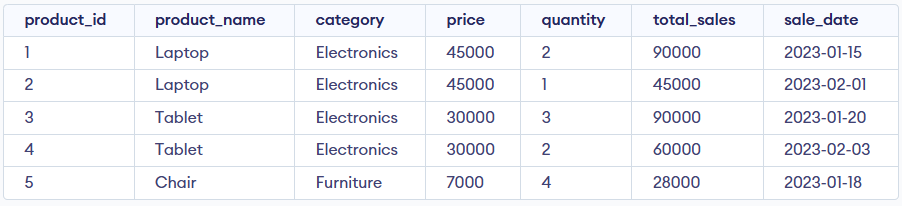
Here, we demonstrate the usage of the MAX() function using a single sample table named Products. Consider this Products table for all the examples below:
In this example, we see how the MAX() function retrieves the highest total_sales value from the Products table while ignoring NULL values.
Query:
SELECT MAX(total_sales) AS [Highest Total Sales]
FROM Products;
Output:
In this example, we see how the MAX() function returns the highest price after filtering rows based on a specific condition.
Query:
SELECT MAX(price) AS [Highest Price in Electronics]
FROM Products
WHERE category = 'Electronics';
Output:
In this example, we use MAX() to get the most recent sale date from the table.
Query:
SELECT MAX(sale_date) AS [Latest Sale Date]
FROM Products;
Output:
In this example, we use MAX() with GROUP BY to find the highest sale amount for each product.
Query:
SELECT product_name, MAX(total_sales) AS [Top Sales Amount]
FROM Products
GROUP BY product_name;
Output:
In this example, we use MAX() inside a subquery to get the product with the highest total_sales.
Query:
SELECT *
FROM Products
WHERE total_sales = (SELECT MAX(total_sales) FROM Products);
Output:
In this example, we use MAX() with HAVING to filter product groups based on their highest total sales.
Query:
SELECT product_name, MAX(total_sales) AS HighestSale
FROM Products
GROUP BY product_name
HAVING MAX(total_sales) > 50000;
Output: