|
VOOZH | about |
|
VOOZH | about |
In SQL, modifying existing records and altering table structures are fundamental operations that allow us to update data and adjust the database schema. The UPDATE command is used to change the values of existing records in a table, enabling us to correct or update data as needed.
On the other hand, the ALTER TABLE command is used to modify the structure of a table itself, such as adding or removing columns and changing data types. In this article, We will learn about How to Modify Existing Data in SQL by understanding various methods with examples and so on.
Modifying existing records in a table is a common requirement in SQL for ensuring data accuracy and consistency. Both commands play a crucial role in maintaining and updating data in a relational database. Let’s take a deeper look at each command and how they work with practical examples. To achieve this, we use two primary commands:
The UPDATE command is used in relational DBMS to change the values of existing records in a table. It is part of Data Manipulation Language (DML) and allows us to update data based on specified conditions. By using the SET clause, we can specify which columns to update and assign them new values. The WHERE clause is essential to target specific rows; without it, all rows in the table will be updated, which can lead to unintended changes.
Syntax
UPDATE table_name
SET column1 = value1,
column2 = value2, ... WHERE condition;
Key Terms
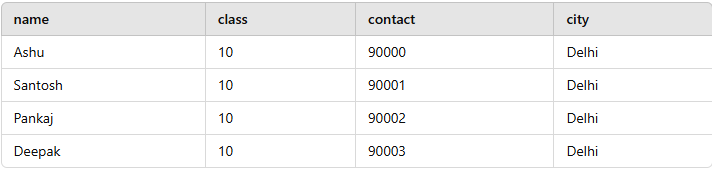
In this example, let’s assume we have a Student table containing student details such as name, class, contact number, and city. We want to update the contact number of a student named Ashu.
Before : Student table
To modify Ashu's contact number, we use the following SQL query:
Query:
UPDATE student
SET contact = 91111
WHERE name = 'Ashu';
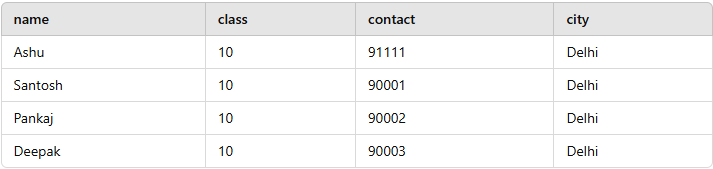
Output
We used the UPDATE command to change the contact number for the student Ashu. The WHERE clause ensured that only the record for Ashu was updated, leaving other records unchanged.
To modify the structure of an existing table in SQL, use the ALTER TABLE statement. ALTER is an SQL command used in Relational DBMS and is a Data Definition Language (DDL) statement. ALTER can be used to update the table's structure in the database (like add, delete, drop indexes, columns, and constraints, modify the attributes of the tables in the database). ALTER command is most commonly used to improve SQL SELECT queries by adding and removing indexes.
Syntax
ALTER TABLE tableName
ADD columnName columnDefinition;
Key Terms
In this example, we modify structure of an existing table by adding a new column called marks_obtained to the Student table to store the marks obtained by each student. Here’s how we can modify the table structure.
Before: Student Table
| name | class | contact | city |
|---|---|---|---|
| ashu | 10 | 90000 | Delhi |
| santosh | 10 | 90001 | Delhi |
| pankaj | 10 | 90002 | Delhi |
| deepak | 10 | 90003 | Delhi |
To add the marks_obtained column, we use the following SQL query:
Query:
ALTER TABLE student
ADD marks_obtained INT;
After: Student Table
| Name | Class | Contact | City | Marks_Obtained |
|---|---|---|---|---|
| Ashu | 10 | 90000 | Delhi | NULL |
| Santosh | 10 | 90001 | Delhi | NULL |
| Pankaj | 10 | 90002 | Delhi | NULL |
| Deepak | 10 | 90003 | Delhi | NULL |
We added a new column, marks_obtained, to the Student table using the ALTER TABLE command. Initially, the new column contains NULL values for all records, as no data has been provided yet.
In SQL, modifying existing data and adjusting table structures are essential operations for efficient database management. The UPDATE command allows us to modify the data within a table based on specific conditions, while the ALTER TABLE command is used to adjust the schema of the table, such as adding new columns or changing column data types. Both commands are fundamental to managing data dynamically and ensuring the database meets changing requirements.