|
VOOZH | about |
|
VOOZH | about |
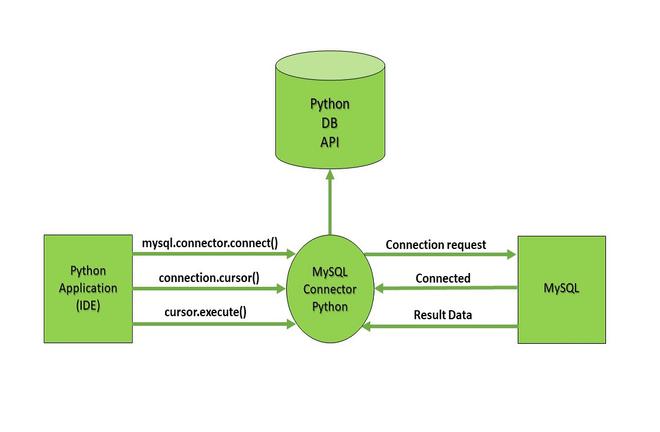
In this article, we will learn how to connect SQL with Python using the MySQL Connector Python module. Below diagram illustrates how a connection request is sent to MySQL connector Python, how it gets accepted from the database and how the cursor is executed with result data.
To create a connection between the MySQL database and Python the connect() method of mysql.connector module is used. We pass the database details like HostName, username and the password in the method call and then the method returns the connection object. Steps to Connect SQL with Python involve:
Download and Install MySQL database in your system.
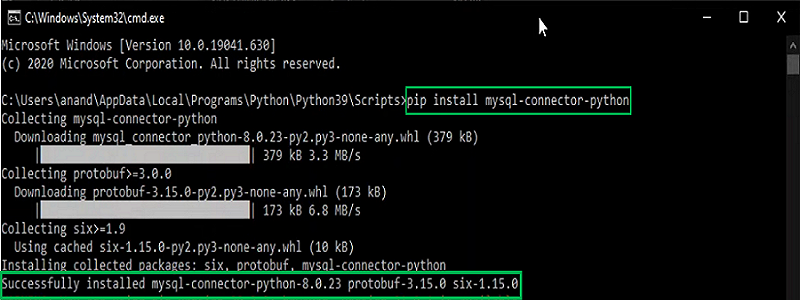
After installing the MySQL database, open your Command prompt and run the commands given below to download and install "MySQL Connector". Here mysql.connector statement will help you to communicate with the MySQL database. Click here to seeHow to install PIP?
pip install mysql-connector-python To check if the installation was successful or if you already installed "MySQL Connector" go to your IDE and run the given below code :
import mysql.connectorIf the above code gets executed with no errors "MySQL Connector" is ready to be used.
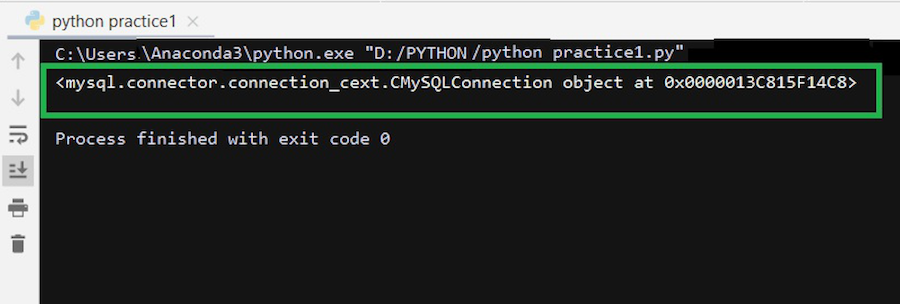
Now to connect SQL with Python run the code given below in your IDE.
host refers to the server where your MySQL database is hosted. In most cases for local development you can set it as "localhost". If the MySQL server is hosted on a different machine, you would replace "localhost" with the appropriate IP address or hostname of that machine.Output:
Now that we know how to connect SQL database with python we can use it to create databases and tables, store data and manipulate them all directly through python. We can create many projects using this way.