In Node.js, modules help structure applications by encapsulating reusable code, improving maintainability and scalability.
Variables share configuration values or constants. Functions provide reusable logic. Classes support object-oriented design. Objects group related data and utilities. Types of Modules in Node.js Node.js provides two primary module systems:
1. ES6 Modules (ECMAScript Modules - ESM) ES6 Modules offer a modern and standardized way to structure Node.js applications. Unlike CommonJS, ESM uses import/export instead of require/module.exports.
Working of ES6 Modules ES6 modules use import and export statements to enable static, standardized module loading in JavaScript.
Uses import to import modules. Uses export to export functions, objects, or variables. Modules are loaded asynchronously, allowing better performance. Requires "type": "module" in package.json. Exporting and Importing Module (ES6 Modules - Named Export)
Use Cases of ES6 Modules 1. Default Export and Import Default exports allow a module to expose a single main value that can be imported with a flexible name.
Exports one primary value such as a function, object, or class. Import name can be chosen freely. More flexible than named exports. Output:
👁 Screenshot-2026-01-14-164757 Default Export and Import 2. Named Exports with Aliases
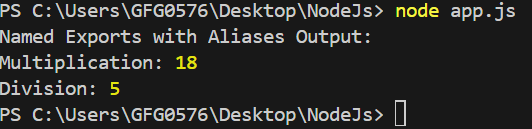
Named exports allow a module to expose multiple values that are imported using their declared names.
Supports exporting multiple functions, objects, or variables. Import names must match the exported names. Aliases can be used during import for flexibility. Output:
👁 named-type Named Exports with Aliases 3. Dynamic Imports Dynamic imports enable JavaScript to load modules at runtime instead of during initial execution.
Improves performance by reducing initial load time. Allows conditional loading of modules. Useful for optimizing large applications. Output:
👁 dynamic Dynamic Imports Combining Default and Named Exports ES6 modules support both default and named exports within a single module, enabling flexible and organized code structure.
Allows a primary default export alongside multiple named exports. Improves code organization and reusability. Supports exporting functions, objects, and classes. Output:
👁 Screenshot-2026-01-14-170534 Combining Default and Named Export 2. CommonJS Modules (CJS) CommonJS is the default module system in Node.js that enables modular code by defining how modules are exported and imported.
Uses module.exports to export values from a module. Uses require() to import modules. Supports exporting functions, objects, or variables. Designed for server-side JavaScript in Node.js. Syntax
//import

const module1 = require('./module1');

//export
module.exports = { module1, module2, ... };
Working CommonJS of in Node.js CommonJS modules use require() and module.exports for dynamic module loading in Node.js.
Uses require() to import modules. Uses module.exports to export functions, objects, or variables. Modules are loaded synchronously, meaning execution waits until the module is fully loaded. It is default in NodeJS, but not natively supported in browsers. Each module runs in its own scope, preventing variable conflicts. Use Cases of CommonJS Modules 1. Creating a Utility Module
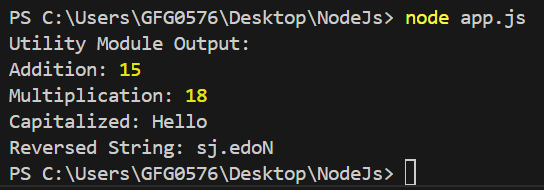
A utility module provides reusable helper functions that simplify common operations across an application.
Handles tasks such as string manipulation and date formatting. Supports number calculations and data transformations. Centralizes logging and error handling. Improves code reuse and maintainability. Output:
👁 utils Creating a Utility Module 2. Building a Configuration File
A configuration file in Node.js stores application settings and environment-specific values separately from the code.
Holds environment variables and application settings. Stores API keys and database credentials securely. Enables environment-specific configurations (dev, test, prod). Improves maintainability and deployment flexibility. Output:
👁 building Building a Configuration File 3. Handling Routes in an Express App
Routing in Express.js defines how an application responds to client requests for different URLs and HTTP methods.
Maps URLs to specific request handlers. Supports HTTP methods such as GET, POST, PUT, and DELETE. Enables structured request handling in web applications. Module Caching in Node.js When a module is loaded using require(), NodeJS caches it, preventing repeated loading and improving performance.
To clear cache, use
Benefits of Using Modules in Node.js Here are benefits of using Modules in Node.js:
Encapsulation: Keeps functionality isolated and exposes only what is necessary. Reusability: Enables reuse across applications, reducing duplication. Maintainability: Simplifies updates, debugging, and scaling. Separation of Concerns: Assigns clear responsibilities to each module.