|
VOOZH | about |
|
VOOZH | about |
The Book Recommendation System aims to enhance the user's reading experience by suggesting books tailored to their interests and preferences. Leveraging the power of machine learning and natural language processing, the system will analyze user inputs and recommend relevant books from a database. In this project, we will develop a Book Recommendation System using NodeJS and ExpressJS. The system will utilize the OpenAI API for natural language processing to provide personalized book recommendations based on user preferences and input.
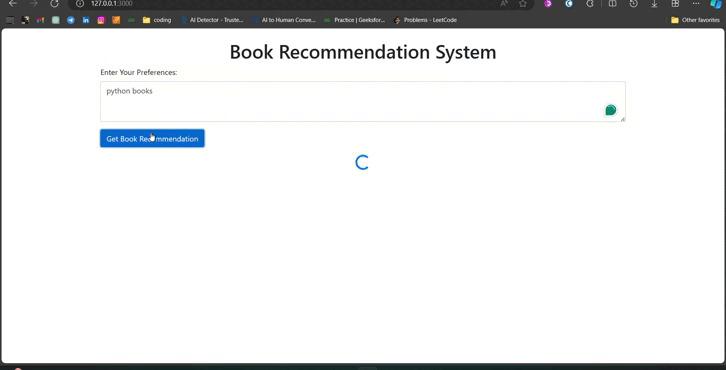
Output Preview: Let us have a look at how the final output will look like.
The Book Recommendation System will include the following functionalities:
Step 1: Create a new directory for your project and navigate into it:
mkdir book-recommendation
cd book-recommendation
Step 2: Create a server using the following command.
npm init -yStep 3: Install Dependencies:You'll need to install Express.js and Axios for making HTTP requests:
npm install express axios dotenvStep 4: Create a .env file, this file will contain your environment variables, including your OpenAI API key.
PORT=3000
OPENAI_API_KEY=your_openai_api_key_here
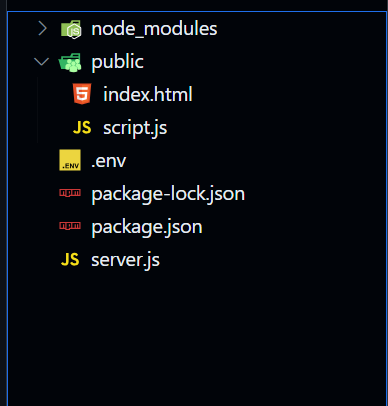
Step 5: Create Files ie. public/index.html this file will contain the HTML structure for our webpage and public/script.js this file handles the functionality of fetching user input and sending it to the server to get book recommendations using the OpenAI API. The server.js file will contain the NodeJS server code to handle requests and interact with the OpenAI API.
👁 Screenshot-2024-02-29-130058
The updated dependencies in package.json file will look like:
"dependencies": {
 "axios": "^1.6.7",
 "dotenv": "^16.4.5",
 "express": "^4.18.2",
 "openai": "^4.28.4",
}
Run the following command to start the server:
node server.jsOutput: