|
VOOZH | about |
|
VOOZH | about |
In the digital age, the need for dynamic and automated document generation has become increasingly prevalent. Whether you're creating reports, invoices, or any other type of document, having a reliable system in place can streamline your workflow.
In this article, we'll explore how to build a Document Generator using Node and Express, two powerful technologies for server-side JavaScript development.
Step 1: Create a directory in which the express application will store
mkdir Nodejs
cd Nodejs
Step 2: Initialize the project with the following command
npm init -yStep 3: Install the required dependencies.
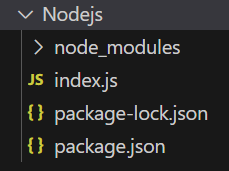
npm install pdfkitProject Structure:
The updated dependencies in package.json file will look like:
"dependencies": {
 "express": "^4.18.2",
 "pdfkit": "^0.14.0",
}
Example: Building a document generator with Node.js and Express.js involves creating an API that receives requests, processes them, and generates the desired documents. In this example, I'll demonstrate a simple document generator that generates PDF files using a popular library called pdfkit. You can install it using npm
Steps to run server:
node app.jsOpen command Prompt/terminal on your computer and run following command to test your document generator:
curl -X POST -H "Content-Type: application/json"
-d "{\"title\": \"My Document\", \"content\": \"Hello, this is the content of my document.\"}"
http://localhost:3000/generate-document > output.pdf
Now, type dir in cmd to see the output.pdf.
Output: