|
VOOZH | about |
|
VOOZH | about |
EJS stands for Embedded JavaScript. It is a template engine designed to be used with server-side JavaScript environments like NodeJS and to generate dynamic content on a web page. Datetime formatting in EJS involves manipulating date and time objects to present them in a desired format within your web application. In this article, we will learn about How to do DateTimeits Formatting in EJS with different different Approaches with it's syntax and example.
We will go through different approaches to Format Datetime in EJS. refer to the example section for examples of all approaches.
In this approach, we can directly use JavaScript's built-in Date object and its methods to format datetime values.
Syntax:
<% let date = new Date() %>
<%= date.toDateString() %>
<%= date.getDate() %>
<%= date.getMonth()+1 %>
<%= date.getFullYear() %>
In this approach, we are using Moment.js library. It is used to do datetime manipulation and formatting in JavaScript. You can include it in your Node.js project and use it's features for datetime operations.
To use Moment.js, You have to install it by using this command:
npm install momentSyntax:
const FormattedDate1 = moment().format('MMMM Do YYYY, h:mm:ss a');
const FormattedDate2 = moment().format('dddd');
Step 1: Create a NodeJS application using the following command:
npm init Step 2: Install required Dependencies:
npm i ejs express momentThe updated dependencies in package.json file will look like:
"dependencies": {
 "ejs": "^3.1.9",
 "express": "^4.18.2",
 "moment": "^2.30.1"
}
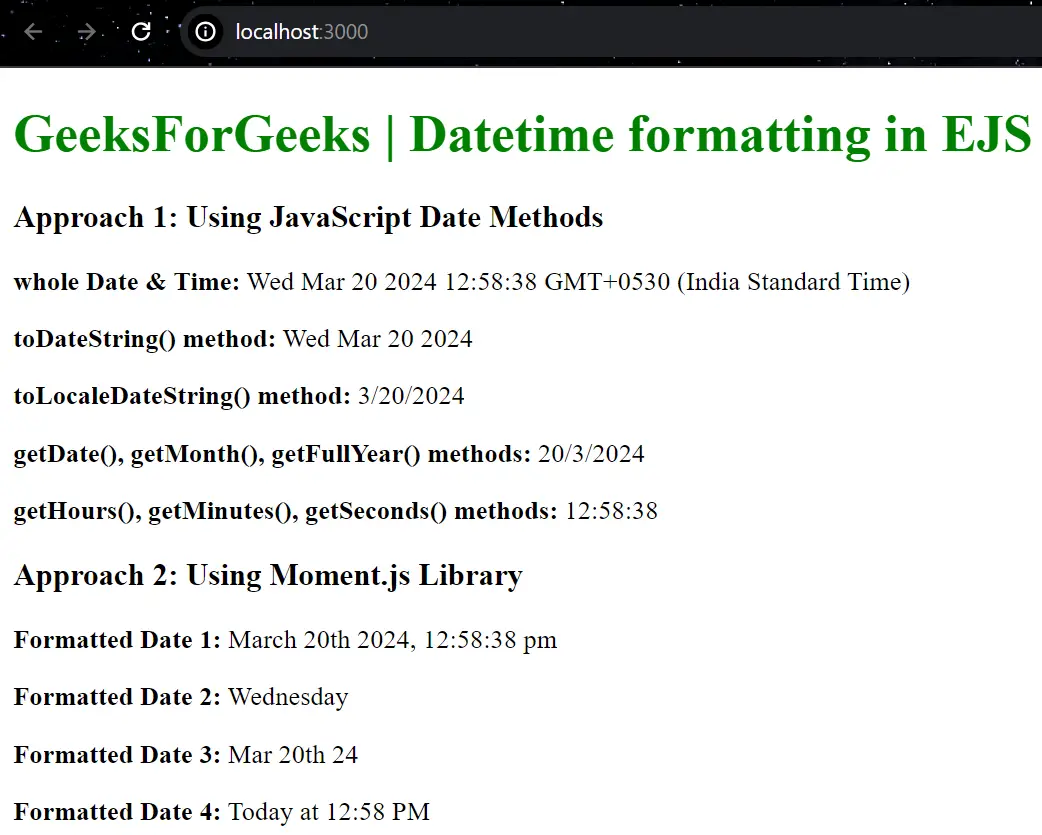
Example: The Below example is demonstrating the Datetime formatting in EJS.
node index.js Output: Now go to http://localhost:3000 in your browser: