|
VOOZH | about |
|
VOOZH | about |
To upload files in Node.js you can use the Multer module, which is a very good module for working with file uploads. By using file upload functionality with Node.js, you can easily manage file uploads from users and store those files on your server.
The Multer module can be downloaded and installed using NPM.
npm i multerAfter you have downloaded the Multer module, you can include the module in any application:
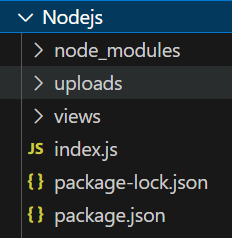
const multer = require("multer");Create a project named nodejs
mkdir nodejs
cd nodejs
npm init -y
Installing express, ejs, and multer
npm install express ejs multer"dependencies": {
"express": "^4.18.2",
"ejs": "^3.1.9",
"multer": "^1.4.5-lts.1",
}
The "uploads" folder stores submitted files, while Multer enriches the request object with a `file` or `files` object for uploaded files and a `body` object containing form text field values upon submission.
diskStorage to handle file uploads.// Multer disk storage setup
const storage = multer.diskStorage({
destination: function (req, file, cb) {
cb(null, "uploads");
},
filename: function (req, file, cb) {
cb(null, file.fieldname + "-" + Date.now() + ".jpg");
}
});
// Define maximum upload file size (1 MB)
const maxSize = 1 * 1000 * 1000;
// Configure Multer
const upload = multer({
storage: storage,
limits: { fileSize: maxSize },
fileFilter: function (req, file, cb) {
const filetypes = /jpeg|jpg|png/;
const mimetype = filetypes.test(file.mimetype);
const extname = filetypes.test(path.extname(file.originalname).toLowerCase());
if (mimetype && extname) {
return cb(null, true);
}
cb("Error: File upload only supports the following filetypes - " + filetypes);
}
}).single("mypic");
// Route for rendering signup page
app.get("/", function (req, res) {
 res.render("Signup");
});

// Route for handling file uploads
app.post("/uploadProfilePicture", function (req, res, next) {
 // Use Multer middleware to handle file upload
 upload(req, res, function (err) {
 if (err) {
 // Handle errors during file upload
 res.send(err);
 } else {
 // Success message after a successful upload
 res.send("Success, Image uploaded!");
 }
 });
});
// Start the server on port 5000
app.listen(5000, function (error) {
 if (error) throw error;
 console.log("Server created Successfully on PORT 5000");
});
Example: Below is the complete code for uploading the file using NodeJS
To strat the application run the following command.
node index.jsOutput: