|
VOOZH | about |
|
VOOZH | about |
Unhandled errors in Node.js can lead to unexpected application crashes, data corruption, and poor user experiences. Effectively managing these errors is crucial for building robust and reliable applications. In this article, we'll explore best practices for handling unhandled errors in Node.js, ensuring your application remains stable and your users enjoy a seamless experience.
Unhandled errors refer to exceptions or promise rejections that are not caught and managed by the application. These errors can occur for various reasons, such as bugs in the code, unexpected inputs, or failures in external services.
try-catch block..catch handler.To fix Node.js errors that aren't being handled, you need to add error handling to your application. Most of the time, try-catch blocks, error handlers, and promise rejections are used in Node.js to handle errors. By putting in place ways to handle errors, you can catch and fix them before they cause your application to crash or do something else unexpected.
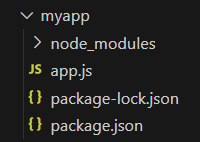
Step 1: Make a folder structure for the project.
mkdir myappStep 2: Navigate to the project directory
cd myappStep 3: Initialize the NodeJs project inside the myapp folder.
npm init -yStep 4: Install the required npm packages using the following command.
npm install expressThe updated dependencies in package.json file will look like:
"dependencies": {
 "express": "^4.19.2",
 }
Try-catch blocks are used to catch errors that happen at the same time as the program is running. The code that could throw an error is wrapped in a try-catch block. If there is an error, the catch block is run, and the error is caught and dealt with. Here's what a try-catch block looks like:
try {
 // Code that can potentially throw an error
} catch (error) {
 // Error handling code
}
Note: However, be careful now, not to use try-catch in asynchronous code, as the error thrown by the async code will no longer be caught in the program.
Example: Implementation to show handling errors using try catch statememnt.
Output:
Error handlers are used to catch errors that happen at different times during the runtime. In Node.js, you can make an error handler by implementing a middleware function that takes four arguments: err, req, res, and next. The error object is in the err argument, and the next argument is a function that passes control to the next middleware function. Here's what an error handler looks like:
Example: Implementation to show handling errors using error handlers.
Output:
Errors in the promises may be found and corrected with the help of promise rejections. A call is made to the catch() function if a promise is broken; this allows any errors to be captured and dealt with appropriately. The following is an example of a broken promise:
Example: Implementation to show handling errors using promise rejections.
You should adhere to these recommended practices if you want to manage unhandled failures with Node.js in an efficient manner:
Handling unhandled errors in Node.js is crucial for building reliable and stable applications. By following these best practices, you can ensure that your application gracefully manages errors, preventing crashes and providing a consistent user experience. Always handle errors in asynchronous code, use centralized error handling, and log errors effectively to maintain the robustness of your Node.js applications.