|
VOOZH | about |
|
VOOZH | about |
Checking if a string is valid mongoDB ObjectID is important while working with databases. It ensures accurate reference the the objects in databases. We can validate the ObjectId with the help of isValid function in MongoDB.
Table of Content
MongoDB creates a unique 12 bytes ID for every object using the timestamp of respective Object creation. This ObjectId can be used to uniquely target a specific object in the database.
It looks like this,
507f191e810c19729de860ea
During a normal backend workflow, the ObjectId might be received based on some computation or use operations. These might result invalid ObjectId and querying databases with the wrong ObjectId gives exception which is then handled later. We can use the ObjectId.isValid function from mongoDB to validate the correct ObjectId.
In this article, we will learn how to check if a string is valid MongoDB ObjectId.
Examples:
594ced02ed345b2b049222c5 --> Valid MongoDB ObjectId
geeks --> Invalid MongoDB ObjectIdMongoose & MongoDB provide a very useful function in ObjectId i.e. ObjectId.isValid("some_id") to validate a string for correct MongoDB ID.
ObjectId can be imported from native mongodb as well as mongoose package.
const ObjectId = require('mongodb').ObjectId;
or
const mongodb, {ObjectId} = require('mongodb');const ObjectId = require('mongoose').Types.ObjectId;
or
const mongoose = require('mongoose');
ObjectId = mongoose.Types.ObjectId;Id;However, it ObjectId.isValid(id) returns true even for invalid strings with length 12.
For example :
| String ID | ObjectId.isValid(id) | Expected Validation |
| 594ced02ed345b2b049222c5 | true | true |
| geeks | false | false |
| toptoptoptop | X | false |
| geeksfogeeks | X | false |
To prevent such cases, another check can be added after default validator which would return true or false based on condition, (new ObjectId created from string) cast to string === string
i.e. (String)(new ObjectId(id)) === id
A function can be created as follows to check if a string is valid ObjectId or not:
const ObjectId = require('mongoose').Types.ObjectId;
function isValidObjectId(id){

 if(ObjectId.isValid(id)){
 if((String)(new ObjectId(id)) === id)
 return true;
 return false;
 }
 return false;
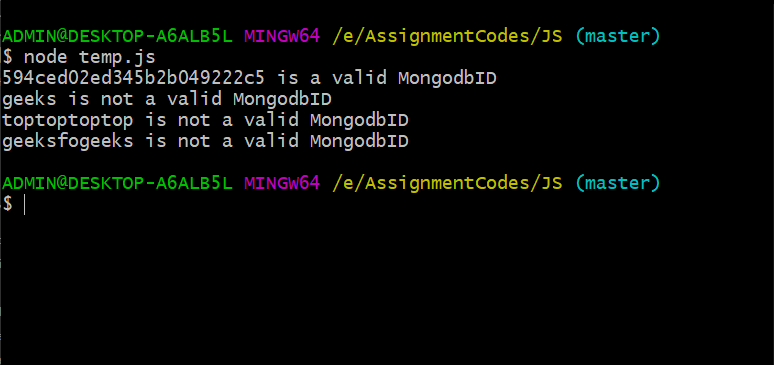
}Output:👁 Image
Results of this function are:
| String ID | isValidObjectId(id) | Expected Validation |
| 594ced02ed345b2b049222c5 | true | true |
| geeks | false | false |
| toptoptoptop | false | false |
| geeksfogeeks | false | false |
The MongoDB ObjectId can be validate using the ObectId.isValid funtion but it fails in some cases hence typecast the id's to string and then compare for more accurate results.