|
VOOZH | about |
|
VOOZH | about |
In this article, we will discuss how to config properties in Express Applications. There are two methods for configuring the properties in Express JS.
Approach 1:Using Environment Variables (process.env)
Environment variables in Express are an excellent method to simply and securely define items like URLs, authentication keys, and passwords that don't change very often. Create a .env file in the project of any Express Application.
Installing the dotenv package, a lightweight npm package that automatically imports environment variables from a .env file into the process.env object. Install dotenv by using the following command:
Syntax:
npm i dotenvNow, In the express application, we need to configure this dotenv package using the below line
require('dotenv').config()Now, Accessing environment variables are quite simple. All variables can be accessed from the process.env object, so, we can access those variables like process.env.VARIABLE_NAME.
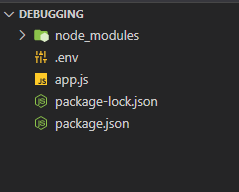
Project Structure:
Example: Let's implement approach 1 in a program and see the output:
app.js
.env file
Steps to run the application: Write the below code in the terminal to run the application:
node app.jsOutput:
Approach 2:Using an external javascript file
We can also store our config properties in any JS file and import that JS file into our express application to access those variables. Follow the steps below for configuring properties into a JS file and importing it into the express application.
Step 1: Create a config Folder
touch configStep 2: Create config.js inside the config folder
cd config
touch config.js
Step 3: Use require statement to import this config.js in our express application
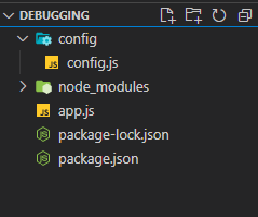
const config_var = require('./config/config')Project Structure:
config.js
app.js
Output: