|
VOOZH | about |
|
VOOZH | about |
A server is a program that listens to client requests and responds with data, such as web pages or APIs. Servers are essential for hosting websites, handling user requests, and serving dynamic content.
ExpressJS simplifies server creation in Node.js by providing an easy-to-use API for handling requests, responses, and middleware
Follow these steps to create a basic Express server with an HTML page.
Open your terminal or VS Code and create a new folder named root. Navigate inside it.
mkdir express-app
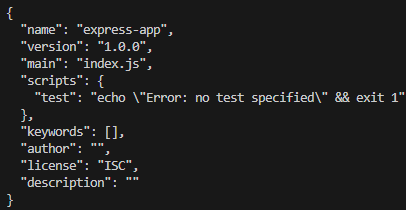
cd express-appRun the following command to create a package.json file, which manages dependencies.
npm init -yInstall Express as a dependency to set up your server.
npm i expressDependencies:
"dependencies": {
 "express": "^4.18.2",
}Create a file named server.js in your project directory and add the following code
In the terminal, start your server with the following command:
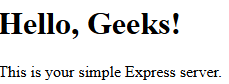
node server.jsOutput