A custom error handler in Express is a special middleware function designed to handle errors in a centralized way. It takes four parameters: (err, req, res, next), where err is the error object. When an error occurs in a route or middleware, it can be passed to the error handler using next(err).
The error handler then processes the error, sets an appropriate status code, and sends a consistent response to the client. This approach improves error management by preventing crashes, simplifying debugging, and ensuring uniform error messages across the application.
To make a custom error middleware first we need to know about the Error.captureStackTrace function in the custom error class.
Error.captureStackTrace in CustomError class
Error.captureStackTrace(this) in a CustomError class helps record where the error happened while removing unnecessary details like the constructor call. This makes the stack trace clearer and easier to debug.
1. Stack without Error.StackTrace
This code defines a CustomError class that extends JavaScript's built-in Error and captures a clean stack trace when an error is thrown. It then simulates a function call chain leading to an error.
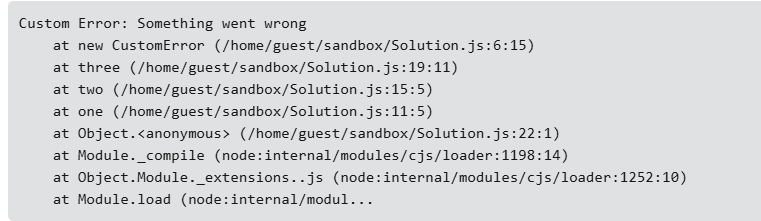
The constructor function (new CustomError) is visible in the call stack because Error.captureStackTrace(this) is used with only one parameter (this), meaning it records the full stack trace, including the constructor.
The one(), two(), and three() functions call each other, forming a function call chain.
The three() function throws a CustomError, which gets caught in the try...catch block.
The catch block logs the error's stack trace, showing the exact sequence of function calls leading to the error, including the constructor, because no second argument was provided to exclude it.
2. Stack with Error.StackTrace
This code defines a CustomError class that extends JavaScript’s Error and removes the constructor from the stack trace using Error.captureStackTrace(this, this.constructor). It then triggers an error through a function call chain.
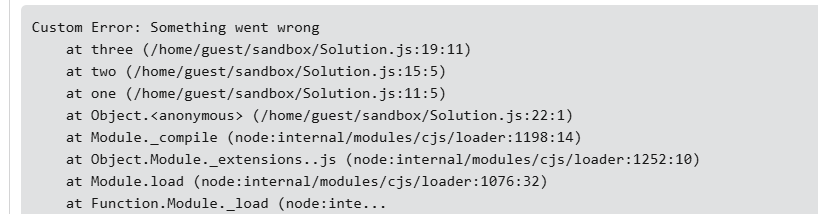
The constructor function (new CustomError) is hidden in the call stack because Error.captureStackTrace(this, this.constructor) removes it.
The functions one(), two(), and three() call each other sequentially, creating a function call chain.
The three() function throws a CustomError, which gets caught in the try...catch block.
The catch block logs the error’s stack trace, showing only the function calls leading to the error, but excluding the constructor, making the trace cleaner.
Now lets make a CustomError Handler in Express
This code sets up an Express server that uses a CustomError class to handle errors in a structured way. It includes a route that deliberately throws an error and a global middleware to catch and respond to errors.
CustomError inherits from the built-in Error class to create structured custom errors.
The statusCode property is added to represent different types of errors (e.g., 400 for bad requests).
Passes the error message to the parent Error class, ensuring proper error message handling.
Removes the constructor from the stack trace, making debugging cleaner.
Allows this custom error class to be used in other files, such as an Express server for handling errors efficiently.
Server.js file workflow
Creates an Express app instance and sets the server to run on port 3000.
Uses express.json() to allow the server to handle incoming JSON data in requests.
A GET request to this route throws a CustomError(400, "This is a custom error!") and forwards it to the next middleware.
Catches all errors, retrieves the statusCode and message, and sends a structured JSON response with the error details.
Calls app.listen(3000) to start the server, logging "Server is running on port 3000".
Advantages of using Custom Error Handler
Centralized Error Handling: Avoids repetitive error-handling logic in multiple routes by managing all errors in one place.
Consistent Error Responses: Ensures all errors follow a structured format, making it easier for clients to understand and debug issues.
Better Debugging with Clean Stack Traces: Using Error.captureStackTrace() removes unnecessary function calls, making debugging more efficient.
Custom Status Codes & Messages: Allows setting specific HTTP status codes and messages for different types of errors (e.g., 400 for bad requests, 404 for not found).
Improved Maintainability: Keeps the codebase clean and organized, making it easier to modify or extend error-handling logic in the future.