|
VOOZH | about |
|
VOOZH | about |
Modules are the building blocks of NodeJS code. They help you break down your project into smaller, manageable pieces, each with its own job.
To create a module, just make a JavaScript file and export what you want to share. Other files can then import and use those exports, adding that functionality to their code.
NodeJS has three types of modules:
To create modules in NodeJS, write functions, objects, or classes in a separate file and use module.exports to export them. Import these modules in other files using the require() function for reuse.
To create a module, you simply need to write code in a separate file. You can then export specific variables, functions, or objects from that file to be used in other parts of your application.
Let’s start by creating a simple module that performs some basic mathematical operations.
File name: calc.js
Now that we’ve created a module, we can import it into another file and use the exported functions.
File name: App.js
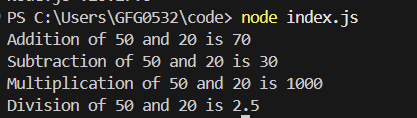
Output