|
VOOZH | about |
|
VOOZH | about |
Node.js is designed to efficiently handle multiple client requests through its event-driven architecture. This architecture allows Node.js to process requests asynchronously, making it ideal for high-performance, scalable applications. When Node.js receives multiple client requests, it places them into an EventQueue. The EventLoop, which is an infinite loop, continuously listens for these events and processes them.
Table of Content
Node.js is built on an event-driven architecture, which means that it does not follow a traditional blocking model where each request is handled one at a time. Instead, it processes incoming requests asynchronously and uses events to trigger specific operations when they are ready. This is how Node.js handle thousands of concurrent client requests efficiently without being blocked by slow I/O operations.
The EventLoop is the core mechanism in Node.js that allows it to process I/O-bound operations (e.g., database queries, network requests) without blocking the main thread. When a request does not require heavy computation or blocking I/O (such as reading a file or making an API call), the EventLoop processes the request asynchronously, freeing up the main thread to handle more incoming requests.
While Node.js handles I/O-bound tasks using the EventLoop, it struggles with CPU-intensive tasks (e.g., image processing, data encryption, or large calculations). Such tasks can block the EventLoop, causing delays in processing other requests.
To overcome this limitation, Node.js offers two important modules:
A single instance of Node.js runs in a single thread. If you have a multi-core system then you can utilize every core. Sometimes developer wants to launch a cluster of NodeJS process to take advantage of the multi-core system.
The cluster module allows easy creation of child processes that all share the same server ports.
Step 1: Create a NodeJS application and install the required Express.js module.
mkdir Project && cd Project
npm init -y
npm i express
Step 2: Create an index.js file on your root directory with the following code.
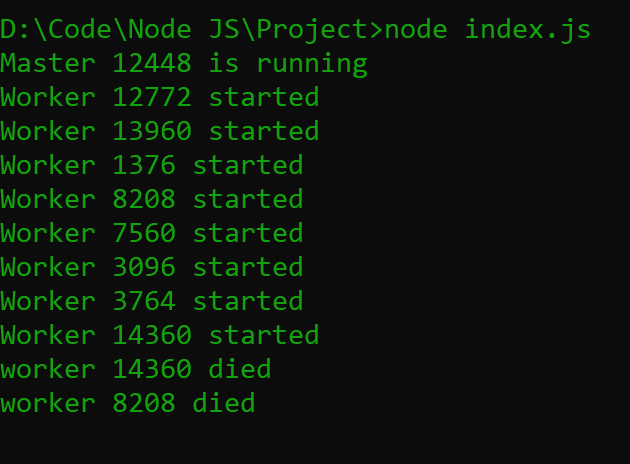
Explanation: If your system has 8 CPU then 8 NodeJS instances will be created and every instance has its own independent event loop. Now NodeJS can process all request parallelly.
They are all share same port (PORT 3000) but not state. The master process listens on a port, accepts new connections and distributes them across the workers in a round-robin fashion, with some built-in smarts to avoid overloading a worker process.
Step 3: Run the index.js file using the following command.
node index.jsOutput:
The best solution for CPU performance is Worker Thread. This module is used in Node.js because it is useful for performing heavy JavaScript tasks.
Example: Create an index.js file with the following code.
Run the server with the following command:
node --experimental-worker index.jsNote: We have to use the --experimental-worker because Workers Thread modules are still experimental.
Output:
{ name: ‘GeeksforGeeks’ }