|
VOOZH | about |
|
VOOZH | about |
In this article, we are going to learn how can we send different types of requests like GET, POST, PUT, and DELETE in the Postman. Postman is a popular API testing tool that is used to simplify the process of developing and testing APIs (Application Programming Interface). API acts as a bridge between two software applications which enables them to communicate and share data. Postman provides a simple Graphical User Interface for sending HTTP requests Like GET, POST, Put, Delete, and viewing their responses.
Table of Content
In Postman, "requests" refer to the HTTP requests sent to a web server, which are used to perform various actions such as retrieving, creating, updating, or deleting resources. These requests correspond to different HTTP methods, each serving a specific purpose in the interaction with web services and APIs:
Before sending the requests first of all create a collection and add different requests to that collection. After that, we can use different requests.
A GET request is used to retrieve data from a server.
POST requests are used to send data to a server.
👁 Screenshot-2023-12-26-152702
PUT requests are used to update existing data on the server. Follow the same steps as the POST request, but select PUT as the method.
Example: Ensure the URL and body data are appropriate for updating data.
👁 Screenshot-2023-12-26-153431
To delete data, use the same endpoints with an item ID.
Example: Send a DELETE request to https://jsonplaceholder.typicode.com/posts/1 to delete the post with ID 1.
👁 Screenshot-2023-12-26-162657
In this example, we will implement a simple REST API and will implement the GET, POST, and DELETE request and we will also test it on the Postman, and observer the output. Here we will use the temperory memory to hold the items so we can work with that with different kind of API requests.
Step 1: Create a simple project, use the following command.
npm init -y
Step 2: There are two dependencies that we have to add in our project, first is express and another one is body-parser. Install these by running the following command.
npm install express body-parser
Step 3: Now create a simple javascript file in our case lets say app.js, and use the following code, in this we have implemented the bodyParser to read the json data and we have set up the GET, POST, and DELETE request.
Step 4: Run the code using the following command.
node app.js
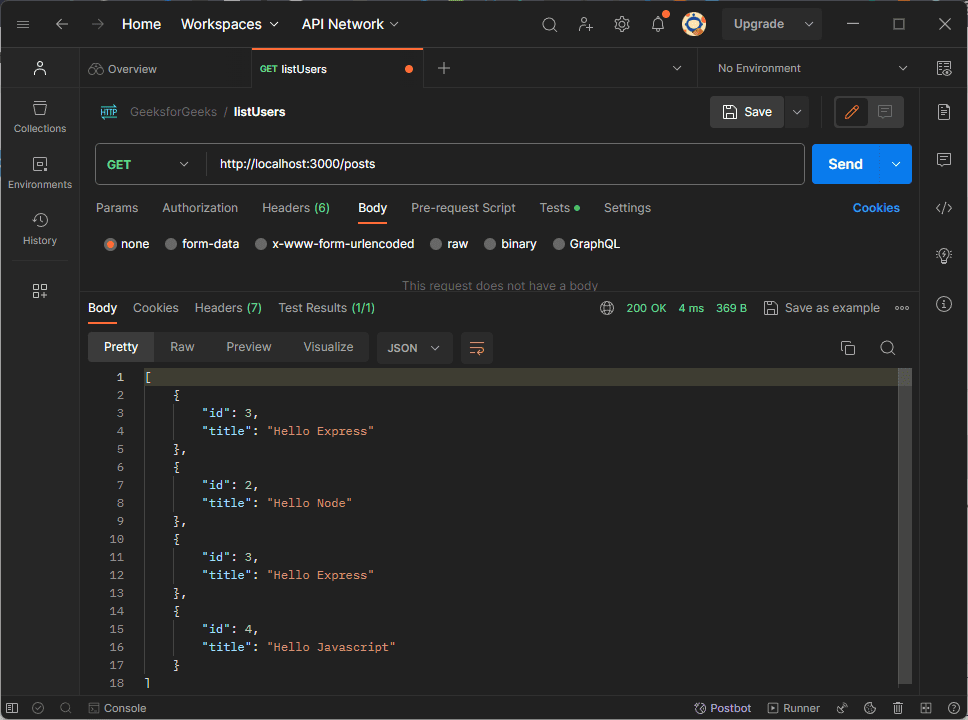
Output: After running the code, the server will run on the port : 300, and now we can use this link to test the API on the postman. http://localhost:3000/posts
GET Request : We can see in the image below that all the posts are displayed below.