|
VOOZH | about |
|
VOOZH | about |
Nodemailer is an npm module that allows you to send emails easily from the backend. In this article, we will cover the steps to send email using a Gmail account with the help of nodemailer.
To send email with Nodemailer using gmail
Step 1: Initialise the nodejs with the following command to create a package.json file:
npm init -yStep 2: Installing required modules
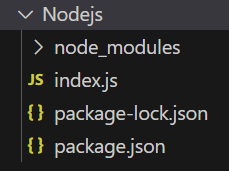
npm install express nodemailer -SProject Structure:
👁 NodeProjThe updated dependencies in package.json file will look like:
"dependencies": {
 "express": "^4.18.2",
 "nodemailer": "^6.9.8",
}
Example: This example uses nodemainler in node js to sent emails uing the gmail account.
Now open the link https://myaccount.google.com/not-supported to Allow less secure apps: ON. Then use node server.js command to run the above code. It will send the email using gmail account.
Type the following command interminal to run code:
Sent mail:
Note 1: To use this code in any file we just have to import this file and call send() function.
const mail = require('./config/mailer')();
mail.send();
Note 2: To send HTML formatted text in your email, use the "html" property instead of the "text" property in sendMail function.
{
 from:'"admin" ',
 to: "user@gmail.com",
 subject:'GeeksforGeeks Promotion',
 html:' <p> html code </p>'
}
Note 3: To send an email to more than one receiver, add them to the "to" property in sendMail function, separated by commas.
{
 from: '"admin" ',
 to: " user1@gmail.com, user2@gmail.com, user3@yahoo.in ",
 subject: 'GeeksforGeeks Promotion',
 text: 'Check out GeeksforGeeks' + 'best site to prepare for interviews and competitive exams.'
}
Google now have come up with a concept of "Less Secure Apps" which is any application which accepts password as plain text. So to use this the application must have OAuth2 authentication.